The data warehouse holds your portfolio, its history and its month ends in one place, in a form that analyses, provisions and collection work can all read. It lives in a PostgreSQL database that you own, such as Supabase, AWS RDS or your own server. Decisimo installs the structure and the logic into that database, and it keeps running there on its own clock. This page explains how the warehouse is organised, how to connect it and which pages show it.
- Where the warehouse lives
- Architecture
- The layers
- Connect your database and load data
- Month ends
- The pages
- Naming conventions
Where the warehouse lives
The warehouse is always installed in your own database. Decisimo does not hold your portfolio. To start, add a PostgreSQL destination as described in Data Destinations. Supabase and standard PostgreSQL are both supported. After you connect the database, Decisimo installs the tables, procedures and jobs of the warehouse into it.
A demo database is not a warehouse for production. When you sign up through a template link, Decisimo can create a database for your account so that every screen has data on your first day. That database is for demonstration only. It holds synthetic data, it is not meant to be kept for the long term and it must not be used as a production database. For production, always connect your own database. See Templates and demo workspaces.
Architecture
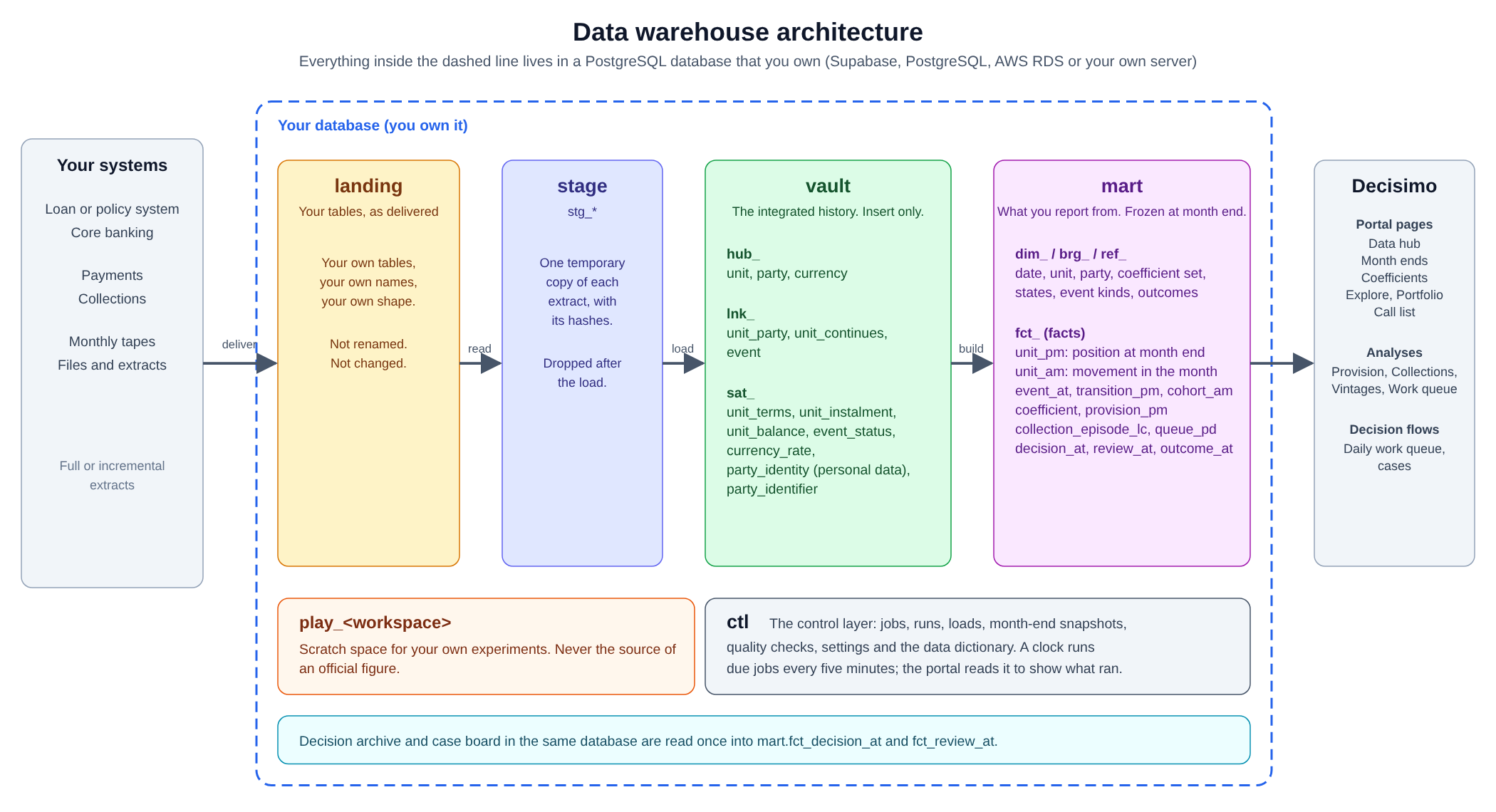
Data moves from left to right. Your systems deliver extracts into your tables, the warehouse reads them, keeps the full history in the vault and builds the reporting tables in the mart. The control layer records every job and check. The portal, analyses and decision flows read the mart.
The layers
The warehouse is split into schemas. Each schema has one job.
| Layer | What it holds | Who owns the names |
|---|---|---|
| landing | Your own tables, as your systems deliver them. The portal shows them as the Data hub. | You |
| stage | A temporary copy of each extract, with its hashes, dropped after the load. | Decisimo |
| vault | The integrated history. Hubs, links and satellites, insert only. | Decisimo |
| mart | Dimensions and facts built from the vault, frozen at each month end. | Decisimo |
| ctl | Jobs, runs, loads, month-end snapshots, quality checks, settings and the data dictionary. | Decisimo |
| play_<workspace> | Scratch space for your own experiments. Never the source of an official figure. | You |
Vault
The vault keeps everything any source has ever said, and it never rewrites it. A change is a new row, so you can read what was known on any date.
- Hubs hold one row per business key: each unit (an account, contract, policy or receivable), each party (a person or organisation) and each currency.
- Links hold relations and movements: who is connected to a unit and how, a unit that carries on as another, and every event such as a payment, drawdown, write-off, recovery, scheduled due, contact or promise.
- Satellites hold the attributes of a hub or link and their history: the terms that were agreed, the repayment schedule, the balance and overdue amount, event status, exchange rates and the identity of a party.
Personal data lives only in the party satellites. This gives erasure one place to act, and no mart table ever holds a name or a birth date.
Mart
The mart is what analyses and reports read. A month that passes its checks is frozen as a month end.
- Dimensions describe who or what: the calendar, each unit with the terms valid in each period, and each party without personal data.
- Facts hold the numbers. The last letters of a fact's name give its grain.
pmis the position at the end of each month,amis what accumulated during the month,atis at the moment of the transaction,pdis the end of each day andlcis the lifecycle of a process. - Reference lists hold the states a unit can be in, the kinds of event and the outcome definitions published from the portal.
The main facts are the position of each unit at month end, what moved it during the month (the opening position plus the movements equals the closing position), how units moved between states, cash collected by starting month, the loss rates and the provision of each unit, each collection episode and the daily work queue. Every archived decision, review and outcome from the decision archive in the same database also becomes a fact.
Control
Every procedure is a job. A clock runs the jobs that are due every five minutes, and each job runs in its own transaction. The control layer records what ran, how it ended and what it wrote. It also keeps each month-end snapshot with its quality checks, and a record of which version of the structure is installed, so each figure traces to the logic that produced it. The full data dictionary is stored here as well, so it can be read without the portal.
Connect your database and load data
- Connect your database. In Data Destinations, add your Supabase or PostgreSQL database. Decisimo then installs the warehouse structure and logic into it.
- Put your tables in the landing schema. Your systems deliver full or incremental extracts into tables with the names and shape you choose.
- Open the Data hub. Tables waiting to be loaded appear under To set up. For each table, confirm what it contains: accounts, events, accounts with months as columns, repayment schedules or links between accounts. Choose the key and match Your column to the Warehouse column.
- Click Start loading. The table appears under Loading, with the time it began.
- Choose the conventions that fit your business. See The pages.
After this, the warehouse loads each delivery, checks it and builds the mart without further action. Each delivery should hold whole periods or whole schedules, and the portal tells you when one does not.
Month ends
At each month end the warehouse takes a snapshot of every unit: its state, balance and overdue amount. The snapshot runs its checks, for example that the opening position plus the movements equals the closing position. A month that passes is ready to Publish. Analyses read published month ends only.
If you later correct the past, Restate the month. A restated month does not overwrite the old figures. It adds a superseding snapshot, and the figures built on the old one are marked Stale. A month that has been provisioned is never redone.
The pages
| Page | What it does |
|---|---|
| Data hub | Shows the tables that are loading and the ones waiting to be set up, and lets you map your columns to the warehouse. The Payments settings choose the order in which a payment settles fees, interest and principal, and whether days overdue come from the repayment schedule or as delivered. |
| Portfolio | The overview of the book: loss rates, provisions, roll rates, cash collected and the state of the latest month. |
| Month ends | Lists every month with its units, provision and checks. Use it to Publish a month or Restate it. |
| Coefficients | Shows the loss rates per state. A set is Calibrated from twelve months of transitions, weighted by units or balance, then Approved once by a person from a month end. Each month uses the latest approved set in force on its date. A set is never recalculated. |
| Explore | Lets you slice the book by state, stage, product, segment or vintage for any published month end. |
| Call list | The daily work queue by person, ranked by priority, with the queue, balance, number of units and the number to call. You can export it. |
| Settings | The conventions the warehouse follows, such as when a unit moves to stage 2 (30 days overdue by default), how forborne units are treated, the limit factor for undrawn amounts and the loss given lost used when none can be measured. Each choice records who made it. |
The analyses that read the warehouse are Provision, Provision back-test, Collections, Vintages, Collection queue and Work queue. See Data your analyses read.
How the provision is calculated: exposure multiplied by the chance of loss and by the loss given lost. Stage 1 uses the 12-month chance, stage 2 uses the lifetime chance and stage 3 is certain. A unit moves to stage 2 at 30 days overdue, or when it is forborne, unless you change the setting. Stage 3 is a state you define as lost, for example over 90 days overdue.
Naming conventions
The warehouse uses one naming convention everywhere, so a name tells you what a table or column holds.
- Tables are
type_subject_grain:hub_unit,sat_unit_balance,dim_date,fct_unit_pm. The types arehub,lnkandsatin the vault,dim,fct,brgandrefin the mart, andctlin control. - Columns start with a word for their class:
amt_balance(money),cnt_(a count),date_,dtime_,days_,rate_(a fraction, so 0.05 is 5%),is_(a flag),code_andname_. Identifiers end in_idwhen they are Decisimo's and_keywhen they are your source's. Anything not modelled is kept inattrs. - Names are in English, are never translated and say
unitrather than loan, so one warehouse serves lending, insurance and receivables. The portal shows translated labels. - One column name always means one thing.
Your own tables in the landing schema and your play_ schemas keep the names you give them.