A case design describes work that stays open as information arrives over time. People and automated tasks each contribute, and the case is done when its decisions are on file. You build the design once, release it, and the execution node runs a case from it for every matter that comes in, such as a loan application or a fraud alert.
Case designs live in the portal under Build → Case designs. Open one to enter the case design studio, where the pages in this category cover each part of the design. If you want to build something right away, start with Building your first case design.
- What a case design is
- Case design or decision flow
- Vocabulary
- The studio
- Header actions
- From design to running cases
- Markdown export
What a case design is
A case design has three kinds of parts:
- Record types declare the shapes of information a case can hold, such as an applicant or a submitted document. Each record type lists its attributes. See Record types.
- Tasks do the work. Each task has a type (Human task, Document OCR, AI, External data, Decision logic, or Memo), conditions that say when it runs, and outputs that say what it writes back. See Tasks.
- Decisions say when a case is finished. Each decision is a case file key, such as
$.decision, or a record type name. The case completes when the declared decisions are present. See Decisions and completion.
Tasks do not follow a drawn sequence. A task runs when its conditions are met, and its outputs can then satisfy the conditions of other tasks. The order emerges from what each task reads and writes. The Flow section draws that resulting graph for you (Flow and impact).
Case design or decision flow
A decision flow answers a single call. Data goes in, rules and models evaluate it, a decision comes out, and nothing is kept. It is the right tool when everything needed for the answer is available at the moment of the request.
A case is for work that cannot finish in one call. Perhaps a document arrives later, a person has to review something, or two officers have to agree. The case keeps its records and case file between those moments, for hours or weeks, then picks up again whenever a task's conditions become true.
The two work together rather than compete. A Decision logic task inside a case can run a rule set, a decision table, a decision tree, a scorecard, a custom function, or a whole decision flow. That lets decisioning you already built keep its place inside a longer-running case. See Automated tasks.
Use a decision flow when one request carries all the input. Use a case design when the input accumulates and people take part.
Vocabulary
| Term | Meaning |
|---|---|
| Case design | The definition you edit in the studio: record types, tasks, and decisions. |
| Case | One running instance of a case design on the execution node. |
| Case file | The working memory of a case. A set of keys and values that tasks read and write, addressed by paths such as $.decision. |
| Record type | A declared shape of information, either a structured JSON record or a file, with named attributes. |
| Record | One piece of information on a case, typed by a record type. |
| Attribute | A named field on a record type. |
| Task | A unit of work in the design. It runs when its conditions are met. |
| Task type | What kind of work a task does: Human task, Document OCR, AI, External data, Decision logic, or Memo. |
| Condition | A check against the case file that decides when a task runs. |
| Decision | A case file key or record type whose presence completes the case. |
| Execution node | The server that runs cases and decisions for your tenant. |
The studio
The studio opens on the Tasks section. Its vertical menu on the left switches between eight sections. Tasks and Record types also show how many items the design holds.
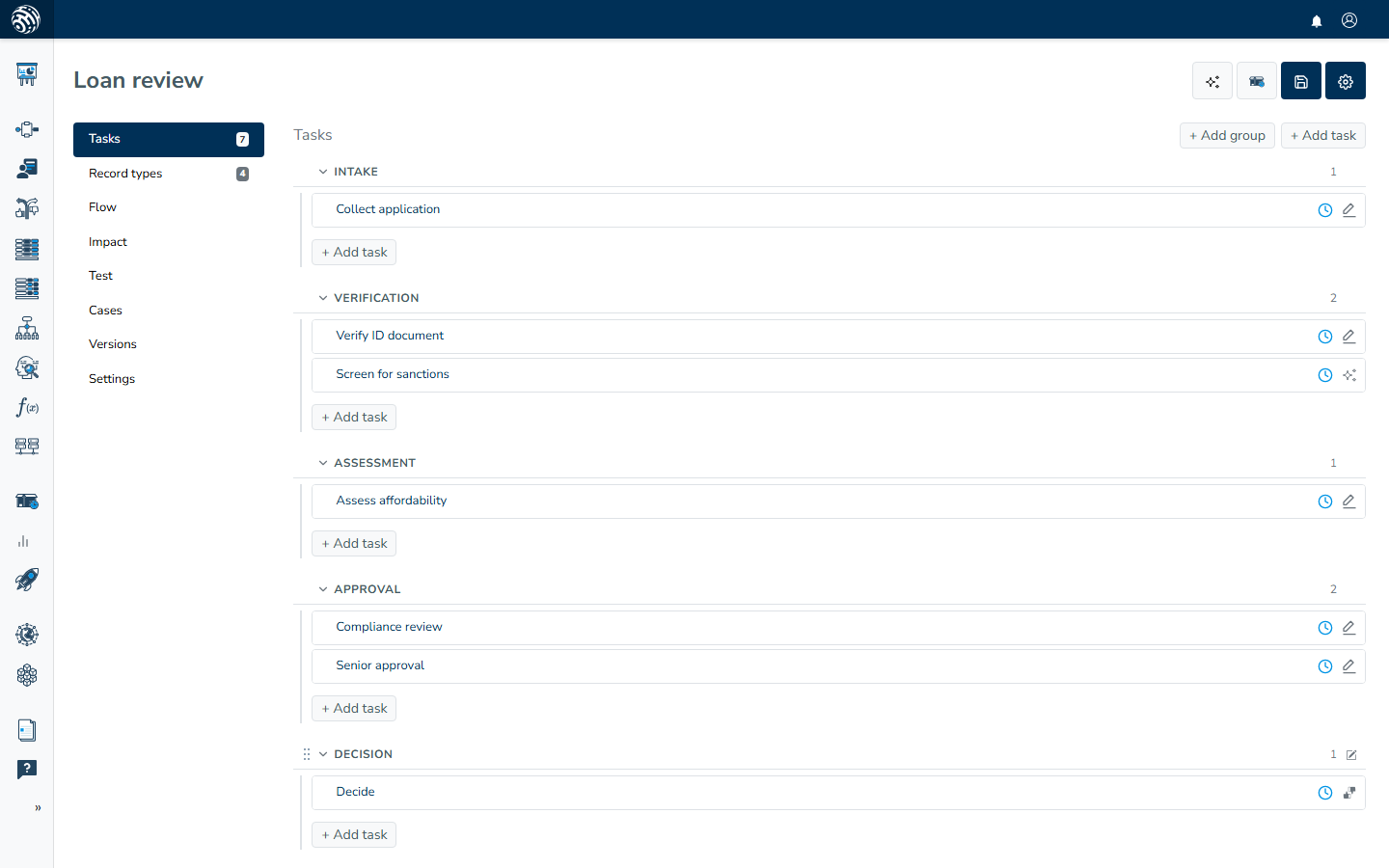
| Section | What you do there | Details |
|---|---|---|
| Tasks | Build the tasks, group them into sections, drag to reorder. | Tasks |
| Record types | Declare record types and their attributes. | Record types |
| Flow | Read the graph of how tasks feed each other. | Flow and impact |
| Impact | See what your unreleased changes touch. | Flow and impact |
| Test | Run scenarios against the draft before releasing. | Testing a case design |
| Cases | Review the live cases running on the execution node. | Reviewing live cases |
| Versions | Compare draft edits and releases. | Versions and comparing changes |
| Settings | Title, Identifier, Description, the Decisions list, and Complete when. | Decisions and completion |
Header actions
Four buttons sit at the top right of the studio.
- The sparkles button opens the AI Decision Assistant. From a description, it drafts or edits the design for your review and approval. See AI Decision Assistant for case designs.
- Release publishes the current design to the execution nodes. It stays disabled until the design has at least one saved task, at least one decision, and every decision is produced by some task. Its tooltip names the missing piece. See Decisions and completion and Releasing.
- Save stores the whole design in one save, including the settings plus every record type and task, including unsaved drafts. Ctrl+S does the same. Individual tasks also have their own Save task button, described in Tasks.
- The gear menu holds Export, which is the Markdown export, and Delete. Deleting asks for confirmation before it removes the case design.
From design to running cases
A case design moves through three stages.
Design. You edit a draft. Save persists it, and nothing you save affects live cases. The Test section runs scenarios against the current draft, so you can exercise a design end to end before releasing it. Testing does need an execution node. If none is set, the Test section reports "No execution node is set to run cases for this tenant. Choose a case location in instance administration."
Release. Release takes a snapshot of the draft as a numbered release and sends it to every execution node set to run cases for your organization. The design is validated first, and problems are reported by message with the toast "Case design has unresolved references". Some findings still publish as warnings, shown as "Published, with something to check". The details are in Releasing.
Run. Cases are created and run on the execution node from the latest release. Each case keeps its records and case file there. The Cases section of the studio shows the live cases, including each case's tasks, case file, and activity (Reviewing live cases).
Running cases needs one-time setup: an execution node marked to run cases and a destination configured to store cases. Runtime setup walks through both.
Markdown export
Export in the gear menu downloads the design as one Markdown document named after the design's identifier. It contains the title and description, the decisions and the Complete when mode, a table of record types with their attributes, and the tasks grouped by section. Each task includes its type, what it iterates over, and how many conditions and outputs it has.
The export is a snapshot for sharing and review with a colleague or an auditor. It is not an import format. Edit the design itself only in the studio.