Rule mining reads your labeled history for conditions that separate bad cases from the rest, then proposes candidate rules with the supporting numbers and the attribute vocabulary already present in your data. It does not invent policy, and the decision remains yours.
- Where it lives
- Setting up a run
- How the pool is split
- Reading a finding
- Why the order is not by lift
- Rules that overlap the current policy
- Proposing findings
- Mining a narrower set of rows
- Attribute roles
- Earlier runs
- When nothing is found
Where it lives
Open a release and choose the Rule mining tab, which appears only when a decision archive destination exists because mining reads production rows. A run also needs an outcome to learn from; see Production data and outcomes.
Setting up a run
| Field | What it does |
|---|---|
| Endpoint name | Restricts the pool to one endpoint. Empty means all of them |
| From and To | The window on when decisions were received |
| Row limit | At most 50,000 rows, 10,000 by default |
| Realized outcome | Required. The label to learn from |
| Minimum rows per rule | The support floor, 30 by default. A candidate covering fewer rows than this is never reported |
Mine rules queues the run, and the page reports "Mining, 4,180 rows in" until processing finishes and the findings appear underneath. Your policy is not changed by the run.
The support floor deserves particular attention because, at 30, a rule can be reported on the strength of a handful of bad cases; on a book with a 1% bad rate, that can be noise wearing a suit. Raise it when your base rate is low, and lower it only when you know the pool is small.
How the pool is split
Before anything is measured, the rows are divided into two parts: candidates are formed and tested on the training part, while the numbers shown come from the other part, which played no role in finding them. Roughly seven rows in ten train and the rest validate, with the division made by request so that rerunning the same pool uses the same split.
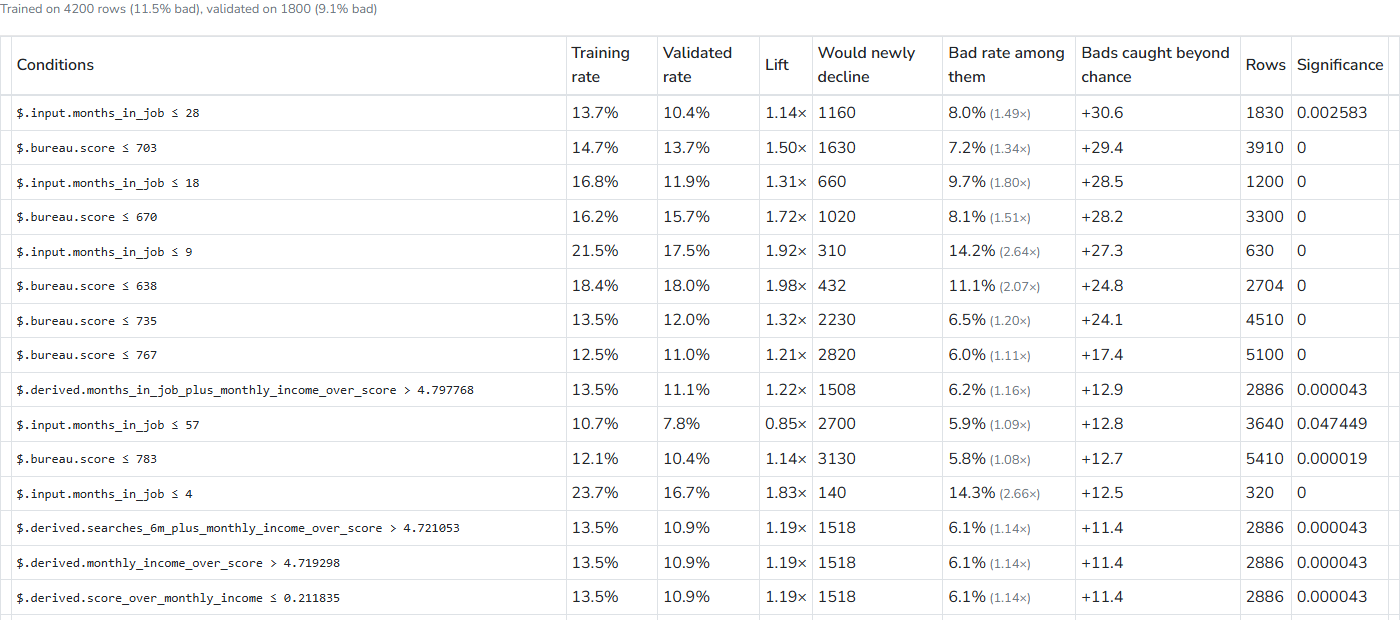
A candidate that fitted noise performs well on the training rows but poorly on the validation rows, so it is dropped. The summary line above the table shows what each side contained: "Trained on 4200 rows (11.5% bad), validated on 1800 (9.1% bad)".
Reading a finding
Each row represents one candidate made from one or two conditions joined with AND, expressed using the attribute paths in your data.
| Column | What it means |
|---|---|
| Conditions | The candidate rule |
| Training rate | Bad rate among matching rows on the training side |
| Validated rate | Bad rate among matching rows on the validation side. This is the number to trust |
| Lift | The validated rate against the pool's base rate. 3× means three times as bad as average |
| Would newly decline | Matching rows the flow did not already decline. Rows recorded as decline are excluded, because declining them again wins nothing |
| Bad rate among the newly declined | The bad rate of exactly those rows, with their lift against the book the flow currently leaves open |
| Bads caught beyond chance | How many more bad cases this rule catches than declining the same number of applications at random would |
| Rows | Rows matched, both sides together |
| Significance | The p-value on the training side. Small means the separation is unlikely to be chance |
The last three columns address the questions a risk owner is likely to ask, because a rule with spectacular lift among applications you already decline does not change the book. The marginal columns show what the rule would actually do on top of the policy you already run.
Why the order is not by lift
Findings are ordered first by whether they held up over time, then by Bads caught beyond chance, and only after that by lift. A rule whose behaviour drifts across periods moves down the list rather than disappearing, while a rule that catches four extra bad cases remains below one that catches forty, regardless of how impressive its ratio looks. Policy mining shows the same time checks in full, per characteristic, under How the answer was found.
Rules that overlap the current policy
A finding tagged Overlaps current policy repeats a threshold already applied by your flow; hover over it to see which one. These findings are not errors, since a mined rule that rediscovers your own cutoff confirms that the mining process found an existing policy boundary, but they rarely need to be proposed because the policy already performs that work.
Proposing findings
Tick the findings worth acting on, choose a target, and press the button.
The target selector lists the rule sets already run by your decision flow, including Add to Knock-outs (Eligibility check), and shows what those rules do: "Rules there set $.policy.knockout = 1, $.policy.reason = the finding's conditions". Choosing a target gives you Propose as revision; the mined rules are appended to that rule set as a new revision and written in the target's action vocabulary, so a decline written there declines in the same way as the rest of the set.
The alternative, New draft rule set, creates a separate draft containing the mined rules, which is useful when the flow has no rule set worth extending yet.
A proposal does three things at once:
- Stores a new revision of the target, leaving the live one untouched.
- Creates the comparison between the current revision and the proposed one.
- Queues its backtest, so the answer to "what would this do" is on its way before you ask.
The notice says "Proposal saved as a revision. Its backtest is queued", and two links appear: Open rule set to review the revision, and Open backtest #482 to watch the check. If you propose the same findings to the same target twice, the result is "This proposal is already the latest revision of that entity".
Nothing is deployed by these actions. The revision remains a draft in your entity's history until someone releases it.
Mining a narrower set of rows
Two buttons on a backtest result can start a mining run on a subset rather than the whole pool: Mine "approve" rows uses the applications recorded with that decision, while Mine these rows on a changed cell uses exactly the applications a proposal would move. The run opens on this tab with a line describing the restriction: "Only rows the flow recorded as approve."
The first option asks what the current policy is missing. The second asks what characterises the applications a change would newly decline or newly approve, which is the question a swap always raises.
Attribute roles
Under the findings, Attribute roles opens the list of attributes profiled by the run, together with each role and its source. Roles determine what an attribute may become: a risk attribute can carry a rule, whereas a product attribute cannot. Change a role here and Save roles preserves it for every later run; suppressed attributes appear underneath with the reason. See Attribute roles.
Earlier runs
Past mining runs lists this tenant's runs with their outcome, endpoint, status, and row count. Open reloads a finished run with its findings, making it worth keeping rather than repeating.
When nothing is found
"No rule survived validation on this pool" means candidates were formed, but none held up on the rows used to check them. That is a real answer, usually explained by one of three conditions: the pool is too small for the support floor, the outcome is too rare in this window, or the policy already catches what there was to catch. Widen the window before lowering the floor.