Open AI register from the user menu under Admin center. Each row is an endpoint with a live release, either a decision flow or a case design. Your account needs read access to API endpoints to view the register.
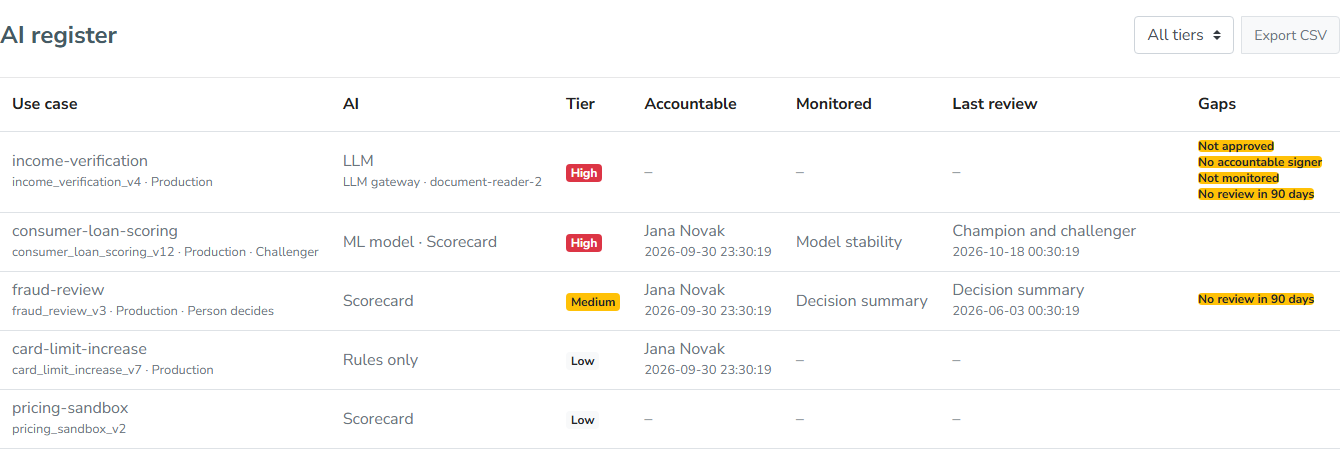
The register loads its information when you open the page, and does not store that information.
What the register shows
The Use case column links to the endpoint and lists its live release and any applicable labels:
| Label | When it appears |
|---|---|
| Production | The endpoint is marked as production. |
| Person decides | The live release is a case design. |
| Shadow | A shadow release is running on the endpoint. |
| Challenger | The live release contains a fork. |
The AI column lists the kinds of components found in the live release: LLM, ML model or Scorecard. If none are present, it shows Rules only. When LLMs are present, the second line lists each provider and its default model. The register checks the release’s steps, including those in sub-flows and case design procedures. Models in LLM mode are listed as LLMs. Other models, including models you bring, are listed as ML models.
| Column | What it shows |
|---|---|
| Use case | The endpoint name, live release and applicable labels, with a link to the endpoint. |
| Tier | High, Medium or Low, based on the endpoint and the live release. |
| Accountable | The signer of the approval step marked accountable, and the date they signed. |
| Monitored | Names of active scheduled analyses on the endpoint or live release. |
| Last review | The latest finished review analysis that matches the use case, linked to its result and showing its date. |
| Gaps | Any outstanding approval, accountability, monitoring or review gaps. |
The register assigns tiers each time you open the page:
| Tier | When it applies |
|---|---|
| High | The endpoint is in production, the release is a decision flow, and it contains an LLM or ML model. |
| Medium | The endpoint is in production, and the release is a case design or its only models are scorecards. It has at least one model or scorecard. |
| Low | The endpoint is not in production, or the release has no model or scorecard. |
Rows are sorted by tier, with High first. Within each tier, production endpoints come first, followed by rows with more gaps and then by name.
Set an accountable signer
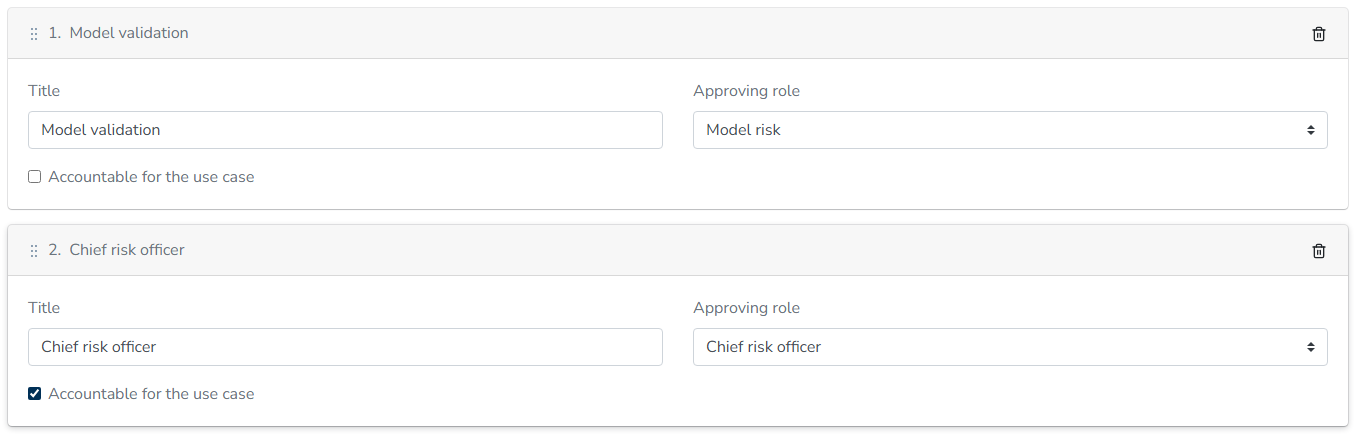
In the approval sequence attached to the endpoint, select Accountable for the use case on one approval step. Only one step in a sequence can be marked this way. Selecting it on another step clears the previous selection. This does not change the order in which approval steps are signed.
An approval sequence without a marked step can still approve releases, but a production endpoint using it has the No accountable signer gap. The CSV lists the release author separately under Built by.
Filter and export
Use All tiers to filter the rows by tier. Select Export CSV to download the rows currently on screen. The file is named ai-register-<date>.csv and has one line per use case.
The CSV columns are Use case, Production, Release, AI, Providers, Person decides, Tier, Built by, Accountable, Approved, Monitored, Last review and Gaps.
Resolve gaps
The register can show these gaps:
- Not approved: A production endpoint’s live release has no fully approved approval process. Attach an Approval Sequence to the endpoint and approve the release.
- No accountable signer: A production endpoint has no signed approval step marked accountable. Mark one step in the approval sequence as accountable and approve the release.
- Not monitored: A High- or Medium-tier use case has no active scheduled analysis on its endpoint or live release. Schedule an analysis to repeat daily, weekly or monthly.
- No review in 90 days: A High- or Medium-tier use case has no finished review in the past 90 days. Run a Shadow review, Champion and challenger, or Release comparison on the endpoint. If the live release has a fork, the endpoint page also has a Champion and challenger card.
A review counts when it runs on the endpoint, its live release, or a shadow deployment of the endpoint. Other analyses that count as reviews are Decision summary, Model stability and Score performance.