A task's run produces a result. The case moves forward when that result reaches the case file, where other tasks can read it. The Writes these attributes list on a task's Setup tab declares exactly what the run leaves behind. Each row is one write, in one of two forms: put a value under a case file key, or create records of a record type from a list in the result.
- The writes list
- Writing a value to a key
- Spawning records from a list
- The keyed by line
- Also write on every record
- Answers from human tasks
- How writes drive the case
The writes list
Open a task card, switch to the Setup tab, and scroll to Writes these attributes. Each row reads like a sentence. A dropdown in the middle switches the row between to key and spawn record. Press + mapping to add a row, or the × at its end to remove one. The next shot shows a list on a task that writes one key and spawns records of one type.
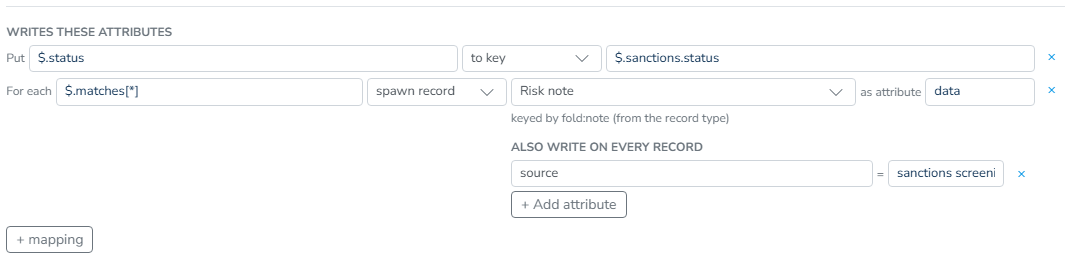
If a task has no rows, its whole result is written under the Output key from its result handling. Once the task has a row, those rows become the complete list of what it writes, and the whole result is no longer written under the Output key.
Writing a value to a key
A to key row reads Put [source] to key [destination].
The source is a path into the task's result. For a Decision logic task that returns {"score": 710, "band": "B"}, the source $.score picks the number 710. The destination is the case file key where that value lands, such as $.credit_score. Both fields offer autocomplete for paths the design already knows about.
Put  $.score   to key  $.credit_score
Put  $.band    to key  $.risk_band
Sources always address this task's result, never the case file. To feed case file data into a task, use its Inputs on the same tab, as described in Automated tasks.
Spawning records from a list
A spawn record row reads For each [source] spawn record [record type] as attribute [attribute].
The source is a path that selects a list in the task's result, such as $.entries[*] when an External data task returns an array of register entries. Each element becomes a record of the chosen record type on the case file, and the element itself is stored under that record's named attribute, data by default. The record type picker also lets you create a new type inline. That type then appears as a draft in the Record types grid.
Spawning turns one task's result into information that other tasks can handle one item at a time. A task set to run For each record of that type gets one run per spawned record. The condition kinds all records have and at least N records have check the spawned set, as described in When a task runs.
The keyed by line
Under every spawn row, the editor shows a line you cannot edit. It tells you which key decides whether an arriving element updates an existing record or creates a new one:
- keyed by surname, dob (from the record type). This is the usual case. The key is the record type's identity, declared by the Identity checkboxes in its Attributes editor. See Identity and matching.
- keyed by surname, dob (set on this task). This row still has its own older key list, and that list takes precedence over the record type's identity.
- no key on this record type, so the same entity arriving twice creates two records. The record type declares no identity, so nothing can match. Every element becomes a new record. If that is not what you want, tick identity fields on the record type.
The key is defined once, on the record type, and only shown here. Every task that spawns the same type then deduplicates on the same fields.
Also write on every record
A spawn row can stamp extra attributes onto each record it creates. The Also write on every record editor under the row holds attribute = value pairs. Its hint states the value forms: "Extra attributes stamped on each record this mints. A value may be plain text, a {{token}}, or {{add a b}}." Press + Add attribute to add a new pair.
A value is template text:
- Plain text is written as is:
source=company_register. {{token}}inserts a value at run time.{{artifact.id}}and{{artifact.label}}name the record the task is running for when the task is set to For each record.{{artifact.expiry_date}}names one of its attributes, and{{artifact.data.amount}}names a column inside itsdata. Any case file key can be used as a token by its path without the leading$., for example{{application_id}}. The{{artifact.*}}tokens always mean the record this task is bound to, not the record being created.{{add a b}}writes the sum of two values for a derived number.
If a token cannot be resolved on a given run, that attribute is left off the record. The case activity notes the unresolved template.
The same stamp editor appears in one other place: under a human task's files or records field once a record type is chosen. There, it stamps the records that field collects.
Use stamps to make spawned records self-describing. They most often carry the id of the parent record or the source they came from, so later conditions and human reviewers do not have to guess.
Answers from human tasks
On a Human task, every form field automatically owns a row in the writes list because an answer someone typed has to land somewhere. The row shows the field name with (the answer) in place of an editable source, and it has no delete button. Hovering over it explains: "Every answer has to go somewhere. Choose where, not whether". You choose the destination key, and nothing else.
By default, the answer to a field named approval_note lands at $.approval_note. Retarget the destination when the answer belongs elsewhere, such as $.review.approval_note. If you later delete the field, an untouched row disappears with it. A retargeted row stays and shows that it reads from a field that no longer exists, so your routing is never silently discarded. Form fields themselves are covered in Human tasks.
How writes drive the case
Writes connect tasks. A task never points at the task after it. Instead, it declares what it writes, and other tasks declare conditions on those keys and records. After every run, the conditions are checked again against the case file. Writing $.credit_score, for example, is what makes "credit_score is filled in" pass and makes the next task eligible.
Spawned records make For each record tasks and the record-set condition kinds active. A write to a key named in the design's decisions is what lets a case reach its outcome. See Decisions and completion.