Every task states when it runs in the When part of its Setup tab. There is no arrow-drawing here. Instead, you describe the situation the task waits for, and the engine runs it whenever a case reaches that situation. Two triggers are available, and both can carry condition rows.
- On a condition
- For each record
- Writing a condition
- The fourteen kinds
- Dual control with different people
- Freshness and re-runs
On a condition
On a condition is the default trigger. The task runs once every row under Conditions holds at the same time. All rows must hold together, with no "or" between them. If you need alternatives, give the design two tasks with different conditions.
A task with no conditions runs when the case starts. That is how a design gets its first task moving: the Overview tab's Needs block reads "nothing, it starts with the case".
For each record
For each record runs the task once per record of the type you pick in For each record type, not once per case. A design that OCRs uploaded documents uses this: one document record means one run; five records mean five runs.
For each record, the engine also waits until that record carries the attributes the task reads. The Overview states this as "a document record has file", derived from the task's own inputs, so you do not have to spell it out.
Condition rows still apply under the label Additional conditions. On a For each record task, they can reach into the current record. The autocomplete offers $.__record and $.__record.<attribute> paths first, so a row like $.__record.__status does not equal failed skips records that already failed.
Writing a condition
Click + condition to add a row. Each row reads from left to right as a sentence: the key, the kind, and, for most kinds, a value.
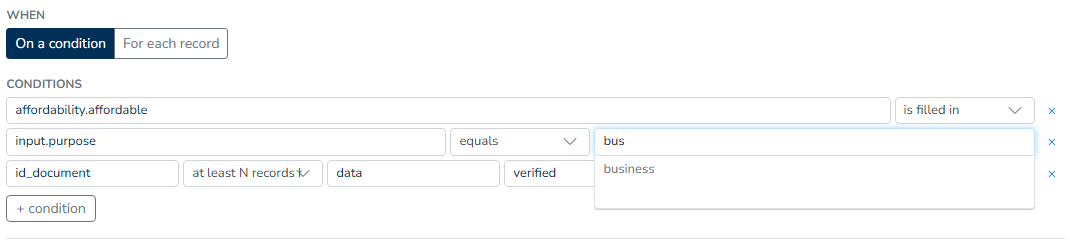
- The key column autocompletes from the case file's known keys. On a For each record task, it also offers the record's own attributes ("this record's attribute or a case file key").
- The kind dropdown contains the fourteen kinds listed below.
- The value column changes with the kind: known values of the chosen key for equals, another key for is newer than, an attribute for the record-type kinds, and so on.
A row missing its key, or either side of compare two values, is incomplete, and the studio will not save it. Both Save task and the header Save stop and name the offender, for example "Condition 2 on "Screen for sanctions" is incomplete. Fill it in or remove it", so an unfinished row is never dropped quietly behind your back. A condition authored elsewhere in a shape the form does not cover renders as raw JSON with the note "No form editor for this shape"; you can remove it, but not edit it here.
The Overview tab restates every row as a sentence under Needs. It is the quickest way to check that the rows say what you meant.
The fourteen kinds
Is filled in
The key has a value on the case file. $.loan_amount is filled in holds once the applicant's loan amount has arrived from the payload or from any task that writes it.
Is missing
The key has no value. Use this for fallback work: a task with $.collateral is missing runs only on cases where no collateral was provided. It is not the way to skip a form whose answers the API payload already brought: an intake task completes on its own when the case file holds its answers, and its writes still run.
Equals
The key's value equals the one you type. decision.result equals refer sends only referred cases to a manual review task.
Does not equal
The key's value differs from the one you type. screening.__status does not equal failed keeps a task away from cases where screening failed.
Is one of
The key's value is in a comma-separated list. $.country is one of CZ, SK limits a registry lookup to two countries.
Is not one of
The key's value is outside the list. $.product is not one of credit_card, overdraft excludes two products from a task.
Is true / non-empty
The key holds true or any non-empty value. checks.pep_hit is true / non-empty triggers an enhanced review when a politically exposed person match was found.
Is newer than
The key was written more recently than another key. $.verification.result is newer than $.document means the verification ran after the latest document arrived. If a newer document lands, the condition stops holding until verification runs again.
Is filled whenever
This is a conditional requirement: whenever the second key has a value, the first must be filled. $.appraisal.value is filled whenever $.has_collateral waits for an appraisal on collateralized cases and passes straight through on the rest.
All records have
Every record of a type carries an attribute. The key column names the record type, and the value column names the attribute. document all records have extracted holds the task until every uploaded document has been through extraction, however many there are.
Compare two values
Two case file values are compared with =, ≠, >, <, ≥ or ≤. $.calculated.dti ≥ $.policy.max_dti routes a case into an exception task when the debt-to-income ratio breaks the policy limit. Both sides are paths, so the threshold can itself come from case data.
Is older than (hours)
The key's value has been sitting unchanged for at least that many hours. offer.sent is older than 48 runs a follow-up task two days after the offer went out. Time alone can satisfy this kind: the engine rechecks the case as the clock crosses the boundary, so the follow-up fires with no new data arriving.
Is fresher than (hours)
The key's value was written within the last that many hours. registry.data is fresher than 24 insists the registry extract is under a day old before a decision task uses it. What happens when it is older is described under Freshness and re-runs.
At least N records have
This kind counts records of a type. The row names the record type and the attribute, with an optional field in record and a value to match; the minimum goes in min. approval at least N records have verdict, field verdict = approved, min 2 requires two recorded approvals before the case proceeds.
Dual control with different people
The at least N records have row carries a different people checkbox. When it is ticked, the qualifying records must come from that many different people, as the tooltip puts it: "The qualifying entries must come from that many different people (dual control)."
This is the four-eyes rule as a condition. With min 2 and different people ticked on approval records, one person approving twice counts once, and the case waits for a second approver. The Overview reads it back as "at least 2 different people have set verdict = approved on approval records".
Freshness and re-runs
Is fresher than (hours) does more than block. When it is the only thing keeping a task from running, the engine treats the stale value as a demand. It finds the task that writes that key and runs it again, so the value is refreshed and the waiting task can proceed. In the Test studio, the waiting task shows the reason "waiting for fresh data" during this process; a task blocked by any other kind shows "conditions not met".
The producing task's earlier runs, from before its value went stale, do not count against its Max runs for this refresh. You do not need to raise the limit on a task just because a consumer demands fresh output from it. The refresh run is allowed on its own.
A worked example: a decision task requires registry.data is fresher than 24. A case comes back for review three days after the registry lookup ran. The decision task waits, the engine re-runs the External data task that writes registry.data, the extract refreshes, and the decision task runs on current data. Nobody had to model the re-run; the freshness requirement on the consumer was the whole configuration.
Conditions decide when a task may start. How often it repeats is governed separately, by Max runs and by new data arriving in what the task reads.