There are three ways you can test a decision table.
-
The unit test is similar to that of the rule set. You have to give input for each column and then click run test.
-
The object test is also similar to the rule set. You need to select a data object and then run a test.
-
And then there is Simulation.
Simulation
Simulation is useful for checking that there are no gaps in decision logic. A gap is when there is no result for a specific segment. Sometimes a part of a segment or a whole segment can be without an assigned result from the decision table. That can happen when a combination of values is missing.
To prepare the definition, you will see a list of columns (attributes) of your decision table. For each column, you may define what may be the potential values generated. You can either list the values or define a range of numeric values. The engine will use the definition to create a sample of synthetic data based on the definition.
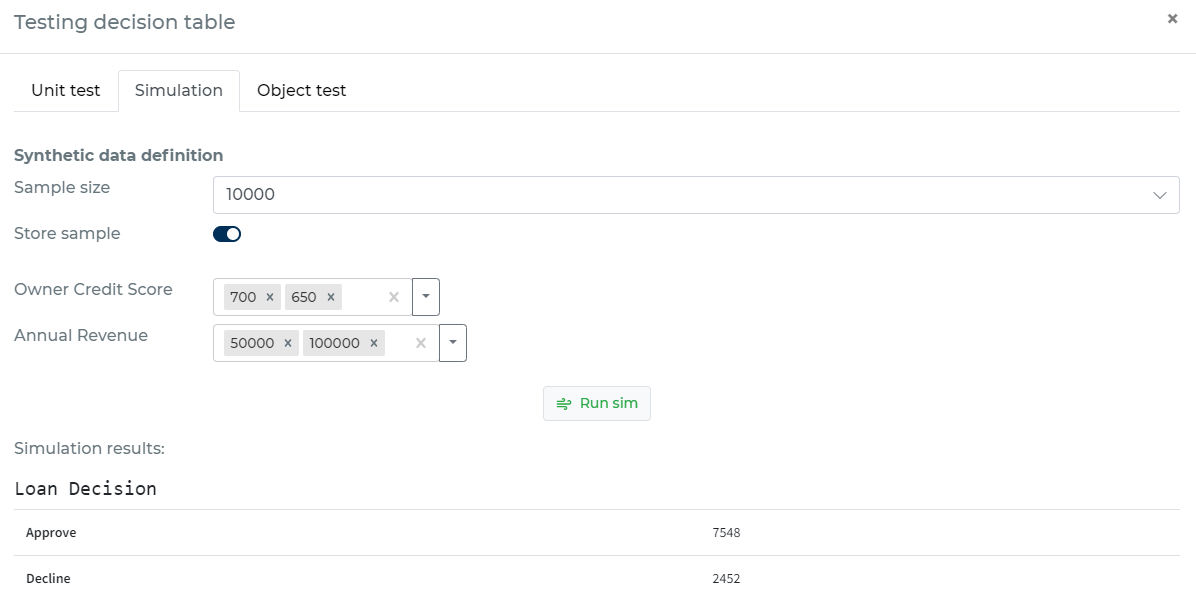
When simulating, the engine will create random combinations using your definition. It will take all the columns from your decision table and the ranges you have defined to create a sample. The engine will then run the sample through the table and will show you summary results. The result will contain the distribution of values assigned to the records in the sample.