An iterative rule goes through a list, checking each item one by one. If an item meets the rule's criteria, the rule does something to that item. The "iterative" part means the rule moves through the list in order, item by item. It’s not about remembering past items or repeating the rule on the same item. Each item is checked separately, and action is taken when needed.
Key Differences to Normal Rule
-
Execution:
Normal rules work on a specific piece of data or a single item. Iterative rules go through all items in a list, one at a time. -
State:
Both types of rules check each item independently. They don’t remember what happened with previous items. -
Purpose:
Use a normal rule for a single check. Use an iterative rule when you need to apply the same logic to every item in a list. -
Complexity:
Iterative rules are not more complex, they’re just designed to handle each item in a list one after another.
Normal rules target individual data points. Iterative rules are for situations where you need to check a whole series of items the same way.
How to Change a Rule from Standard to Iterative
-
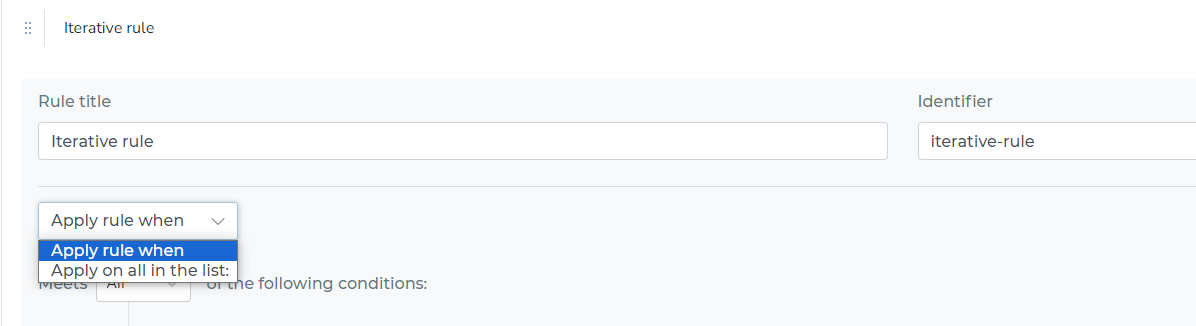
Access the Rule’s Conditions:
Click on the “Apply rule when” section of your rule configuration. -
Change to Iterative Rule:
In the dropdown, select “apply on all in the list”. -
Specify the Data to Iterate Through:
An input field appears. Here, enter the path to the list you want to process, using JSONPath.
For example, if your data has an array namedtransactions, enter$.transactions.
By following these steps, the rule will now apply its logic to every item in the selected list, one after the other.
-
Specify the Data to Iterate Through:
-
After selecting this option, an input field will appear.
-
In this input field, you need to write the JSONPath. The JSONPath is a way of specifying which array within your data object you want the rule to iterate over.
- For example, if your data object has an array named
transactions, and you want the rule to check each transaction, you would enter something like$.transactionsinto the input field.
- For example, if your data object has an array named
-

By following these steps, you change the rule's nature from acting on a specific data item to iterating through each item in the specified array within your data object. This allows the rule to apply its conditions and actions to each item in the list, one after the other.
Using $.__item in Iterative Rules
When you define an iterative rule, each item in the list is checked on its own. To refer to data from the current item (the item being checked right now), use $.__item in your field paths.
What $.__item Does
-
$.__itemalways points to the current item being processed. -
Any path starting with
$.__itemis resolved against the current item, not the parent object.
Example
If your array is transactions and each transaction has an amount field:
-
To set the array for iteration:
Use$.transactions -
To reference the amount for the current transaction:
Use$.__item.amount
If you use $.amount, you reference all amounts in the list. If you use $.__item.amount, you get only the amount in the item being checked right now.
In Rule Conditions and Actions
- In conditions, use
$.__item.field(for example,$.__item.status) to check a property of the current item.
If you do not use $.__item, your rule will not reference the current item in the list. It will not work as expected in an iterative context.
Summary Table
| Where Used | What to Write | What It Refers To |
|---|---|---|
| Iterate over | $.transactions | The array you want to process |
| Item property | $.__item.amount | amount of current item |
| Nested property | $.__item.foo.bar | foo.bar of current item |