What it is
The Fraud Pairs function block helps detect potentially fraudulent patterns where money is moved in and then quickly moved out, within a specified timeframe, and in matching amounts (or nearly matching amounts).
It is designed to highlight situations like:
-
cash-ins followed by suspiciously fast cash-outs
-
multiple credits paired with a matching debit
-
smurfing or money laundering patterns
The block can find pairs or groups of IN and OUT transactions that match closely on amount, within a defined time window.
How it works
The Fraud Pairs logic performs the following steps:
-
Data standardization
-
Normalizes the amounts to absolute values
-
Normalizes transaction direction (IN/OUT)
-
Cleans missing or invalid fields
-
Generates a unique ID if none exists
-
-
Rolling window search
-
For each IN transaction, a rolling time window is defined (for example, 4 days)
-
Only working days can be considered if specified
-
Within the window, candidate OUT transactions are collected
-
-
Subsets and pairings
-
All possible groups of IN transactions up to a configurable limit (default max 5) are generated
-
The sum of each IN group is compared to possible OUT groups
-
The block looks for a matching OUT subset where the total amount is within a defined tolerance percentage (for example, ±0.5%)
-
-
Fraud sets
-
Each successful match is stored as a fraud pair, with the matching IN and OUT sets
-
Transactions are then marked as used, to avoid duplicate matching
-
The rolling window advances for the next IN
-
-
Result output
-
The block outputs all detected fraud pairs
-
Reports the total matched volume
-
Reports the number of fraud pairs found
-
Parameters
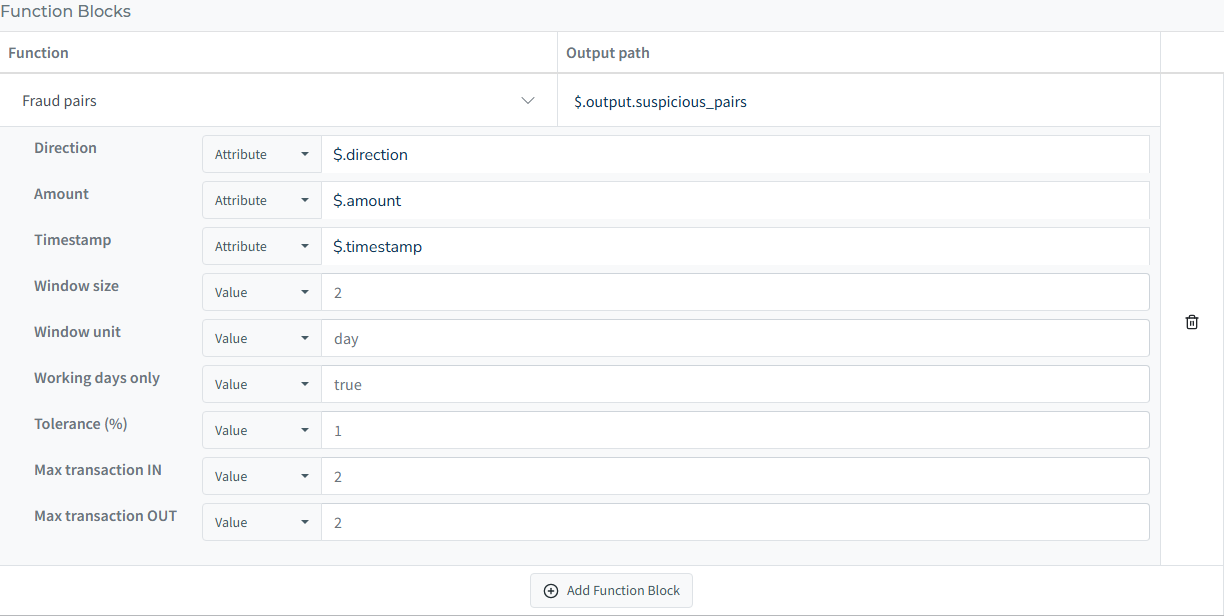
You can configure Fraud Pairs with the following parameters:
| Parameter | What it means | Sample value |
|---|---|---|
| Direction | Which field shows whether a transaction is incoming (IN) or outgoing (OUT). | $.direction |
| Amount | Which field holds the transaction amount. | $.amount |
| Timestamp | Which field contains the date and time of the transaction. | $.timestamp |
| Window size | How far ahead to look for a match, in units of time. | 1 |
| Window unit | The unit of time for the window. | day |
| Working days only | Whether to skip weekends in the time window. | true |
| Tolerance (%) | The margin of allowed difference between IN and OUT amounts. | 1 |
| Max transaction IN | The maximum number of incoming transactions grouped together for matching. | 3 |
| Max transaction OUT | The maximum number of outgoing transactions grouped together for matching. | 1 |
Technical explanation
Technically, the FraudPairs block:
-
Parses transactions into a standardized list with positive amounts and consistent direction
-
Uses a sliding time window, defined in days or hours, advancing per unique transaction date
-
Finds candidate IN/OUT combinations:
-
Generates combinations of IN transactions
-
Recursively searches for OUT transactions that together match the IN group’s sum within the tolerance
-
-
Caps the number of transactions per window and the number of subsets to avoid performance overload
-
Prunes impossible matches by:
-
skipping already-used transaction IDs
-
trimming oversized windows to the largest amounts instead of skipping them
-
sorting OUT transactions by amount for faster pruning
-
-
Supports working days only calculation, ignoring weekends if enabled
Each matched pair is then returned with details:
-
the original transaction data
-
the matched INs and OUTs
-
the matched volume
-
and a unique identifier
Hard-Coded Limits
To protect the system from performance or memory overload, the Fraud Pairs block applies built-in limits behind the scenes. These limits cannot be changed by rule editors in the user interface:
-
Maximum transactions per window: There is a ceiling of 100 transactions within any single time window. When a window holds more, the block keeps the 100 largest amounts and searches those, so the most material transactions are always examined.
-
Maximum number of IN groups to try: The block tests up to 2,000 different combinations of IN transactions within each time window, trying the smallest groups first. Simple one-to-one and one-to-many matches are therefore always covered before budget is spent on larger groupings.
-
Time budget: The search runs for at most 10 seconds. If the budget runs out, the block returns everything found so far instead of failing.
These safeguards help keep the rule engine fast and stable, even when dealing with high transaction volumes.
Best-effort coverage reporting
Whenever one of these limits reduces the search, the result carries an additional __coverage field describing exactly what was reduced: which windows were trimmed (windows_trimmed), where the combination budget ran out (windows_capped), and whether the time budget expired (stopped_early). A result without __coverage came from a complete search. You can reference this field in your rules, for example to route a case to manual review whenever __coverage is present.
If you need to increase these limits, please contact us.
What the block does with your rows
The block reads three fields from each row, by the paths you configure, and leaves everything else alone.
| Behaviour | What it means for your data |
|---|---|
| Amounts parse like rule conditions do | 1 234,56, 1,234.56, $1,234.56 and EUR 1234.56 are all read as 1234.56. |
| A negative amount reverses the direction | -500 or (500.00) on an OUT row is treated as 500 coming in. The row itself is not changed. |
| Tolerance is measured on the inflow | At 0.5%, an inflow of 1005.02 matches an outflow of 1000, because 1000 lies within 0.5% of 1005.02. |
| A row without a readable amount, direction or date is skipped | Bank fee lines with an empty amount do not stop the run. |
Your id field is passed through, never used for matching | Rows are told apart by their position in the list. An id that repeats, an account or batch number for instance, costs no pairs. |
| Each pair carries your rows as you sent them | Every field comes back unchanged. An id is added only when you sent none. |
At exact matching (tolerance 0) the result is the same whatever order the rows arrive in. At a looser tolerance with several transactions per side, a window can exceed the combination budget described in the limits above; the search then covers the rows in the order they arrived, and a statement whose rows carry only a date and no time can answer differently when its rows are reordered. __coverage is present whenever that budget was reached.
Best practices
-
Keep the window size small to maintain performance
-
Always test the tolerance_pct to match your fraud threshold
-
If you expect high transaction volumes, adjust the caps carefully
-
Use consistent direction fields (IN / OUT) in your data
Quick Example
“Detect suspicious cash-outs within 3 working days after cash-ins, with amounts within 1% difference.”
-
Configuration for this scenario:
-
Window size: 3
-
Window unit: day
-
Working days only: true
-
Tolerance (%): 1
-
Max transaction IN: 3
-
Max transaction OUT: 3
This setup will look for up to 3 incoming transactions grouped together, then check if there are up to 3 outgoing transactions that match their total amount within 1% difference, all happening within 3 working days.
-