Analysis over production data reads two tables in a database you own and control: the decision archive, which Decisimo writes after your decision flows run, and the outcome history, which you write with what happened afterwards. Only the second requires anything from you, but it is what turns "this change would move 92 decisions" into "those 92 applications defaulted five times as often as the ones you kept".
- The two destinations
- Setting up the outcome history
- The table you fill
- Matching an outcome to a decision
- Naming outcomes
- What counts as bad
- Checking that it worked
- When something is missing
The two destinations
Both destinations are configured on a database connection in the same way as other destinations; see Data destinations. Their purposes are different, and each table has a distinct writer.
| Purpose | Who writes it | What it holds |
|---|---|---|
| Decision archive | Decisimo, after every decision | The request, the full result, the endpoint, the release, and the times |
| Outcome history | You | What happened to that application later, and when you observed it |
Both destinations must use the same connection, because the two tables are joined inside your database; the analysis therefore asks your database to put the label beside the decision, and only aggregates come back to us.
Setting up the outcome history
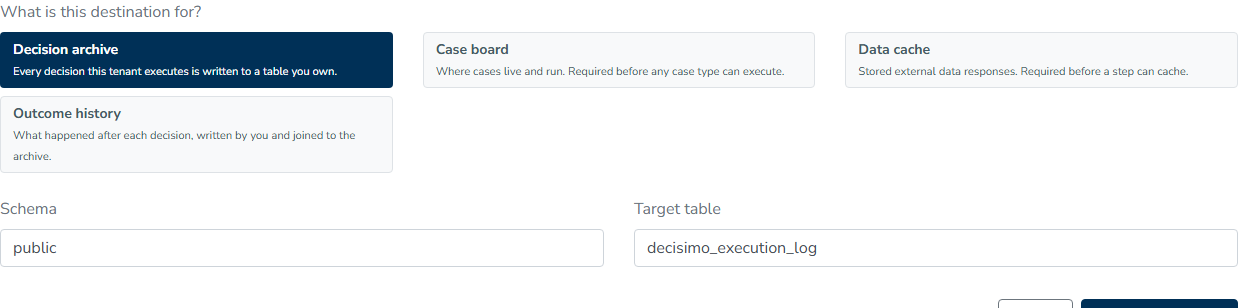
On the connection that already carries your decision archive, add a destination whose purpose is Outcome history; its hint describes the destination as "What happened after each decision, written by you and joined to the archive."
Choose the schema and table, then prepare the destination so Decisimo can create the table and its indexes as it does for the archive, after which the table is left alone. Switch it on with Enabled afterwards.
The table you fill
The prepared table is decisimo_outcome unless you named it otherwise:
| Column | What goes in it |
|---|---|
tenant_id | Your tenant number, the same one the archive rows carry |
request_id | The decision this outcome belongs to |
external_ref | Optional. Your own reference for the case, such as an application number, so you can reconcile the table against your systems |
outcome_name | What you are recording, for example default_12m |
outcome_value | The observation itself, as JSON: true, false, 1, 0, or a value you compare against |
dtime_observed | When the outcome became known. Used to split a pool by time |
dtime_inserted | Filled in for you |
Write one row per decision for each outcome name. A unique index enforces that arrangement, so a second write for the same decision and name must update the existing row rather than insert another one; Decisimo does not write to this table, delete from it, or require it to be complete, and unlabeled decisions are simply excluded from figures that need a label.
Matching an outcome to a decision
The join uses request_id, so the value stored there must be the value held by the archive.
Every decision result carries that value as __request_code; take it from the response your integration already receives, keep it beside your application, and write it into request_id when the outcome becomes known. In the archive table it is the request_id column, so you can also recover it later by querying input_json if your own reference is inside the request.
For webhook endpoints, __request_code inside the result is not the same value as the request_id returned by the 202 response, and the archive stores __request_code.
external_ref is indexed for your convenience but is not used for matching, so an outcome row with no request_id never joins to anything.
Naming outcomes
outcome_name is a name of your choosing, and several names can share the same table: default_12m, default_36m, fraud_confirmed, and first_payment_missed. Each analysis asks for one name at a time through the Realized outcome picker, which lists exactly the distinct names in your table; if a name appears there but produces no results, its rows usually contain a different request_id from the archive.
Choose names that describe the horizon as well as the event, because twelve-month and thirty-six-month default behave differently, and a pool in which half the cases have not matured will pull any rate towards zero for a reason unrelated to your policy.
What counts as bad
Analysis needs a definition of the outcome value to avoid.
For backtests and rule mining, an outcome counts as bad when it is true or a number greater than zero, so true / false and 1 / 0 work without configuration.
Policy mining lets you define the value explicitly instead. When the pipeline is asked to recover the logic behind a Recorded decision path, Decision that means declined names the exact value treated as the event, such as decline; the comparison uses the value as written, which means decline and declined are different answers.
Checking that it worked
In any archive form, Preview matching rows returns two counts: "1,240 rows match" and, when an outcome is selected, "870 with outcomes". The second count is the one used by most analysis, so if it is zero while the first is large, the labels are not matching the decisions and request_id is the first thing to check.
When something is missing
| Message | What it means | What to do |
|---|---|---|
| "Connect a decision archive to analyze production data" | No archive destination exists, so there is nothing to read | Add a Decision archive destination on a connection |
| "No decision archive destination is configured" | The run was started before the destination existed, or it was deleted | Add it, then run again |
| "The decision archive destination is disabled" | The destination exists but is switched off | Switch Enabled back on |
| "No outcome history destination is configured" | An outcome was asked for, but no Outcome history destination exists | Add one on the archive's connection |
| "The outcome history is not on the archive connection" | Both destinations exist, on different connections, so the join cannot run inside one database | Move the outcome history to the archive's connection |
| "Reading from the decision archive failed" | The database refused or dropped the read | Check the connection under Destinations, then run again |
| "Too few rows carry this outcome" | The window matched rows, but almost none of them are labeled | Widen the window, or check the matching |