Fraud case management helps decide which alerts need review
On Monday morning, you open the fraud queue and find it already arranged by score, with the weekend’s low-score alerts cleared automatically overnight. The list looks orderly: the alerts still on screen are waiting for someone to decide whether they deserve a case, while the ones that disappeared have left no work in front of you. But one of those cleared alerts was an application on a device another analyst confirmed as fraud on Friday. You are looking at the queue after the system has sorted and acted, before you know what that missing alert means for the cases your team works.
Fraud case management brings related applications into review
Fraud case management is the work between an alert and a recorded decision. A case gathers what is known, assigns review when needed, and keeps the decision on file for later work.
A case holds the alert, the customer and application, related applications as records, the assigned task and its deadline, the outcome and analyst note, plus a memo and activity trail. A case design sets out those records, tasks and decisions for work that stays open as information arrives. It is different from a single decision call.
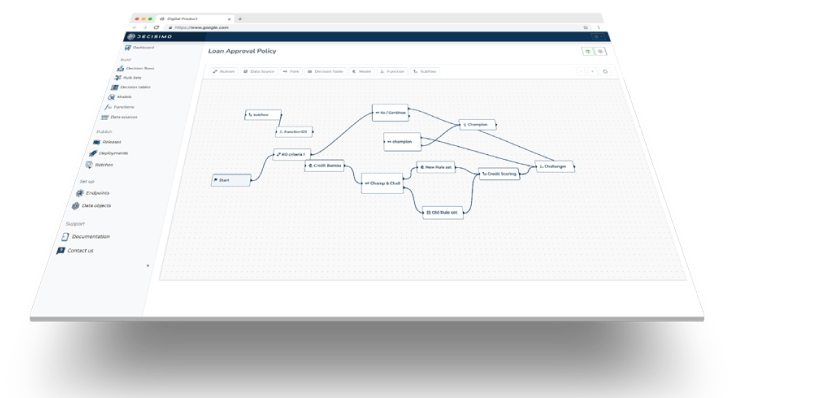
In a queue, an alert usually shows the fraud rules that fired on one application. A rule can also look for repeated activity over time. But the same device, phone, email or account can appear on other applications that look ordinary on their own. Teams often look those details up by hand, if they look at all. Case work can also bring repetitive review tasks and evidence together, as in this overview of case work for anti-fraud efforts.
Linked applications can change an alert’s route
A linked application confirmed as fraud sends a low-score alert to review. In the worked example, A-1042 was confirmed as fraud on Friday. On Monday, A-1101 arrives on the same device with no signals of its own. A rule that reads only A-1101’s score would clear it.
Fraud rules generate many alerts that close as not fraud, so teams prioritize alerts instead of reviewing each one individually. But when the route reads only the alert’s own score, reused details across applications can disappear from view.
The example scores each alert’s own signals in one task, then passes its signal level and linked applications to a network task that sets the route. The signal and network rules were tested on these alerts in Decisimo’s test environment.
The results put the low-score decision in context:
| Alert | Signals | Points, level | Linked, confirmed fraud | Route |
|---|---|---|---|---|
| Clean application, old email, same country | none | 0, low | 0, 0 | clear |
| New email, IP abroad | new email, IP country mismatch | 2, review | 1, 0 | review |
| Low signals, device shared with a confirmed fraud | none | 0, low | 2, 1 | review |
The clean application clears, and the application with a new email and an IP country mismatch goes to review on its own signals. A-1101 has no signals of its own, but one of its two linked applications is confirmed fraud.
Bring linked applications into the case
The case needs linked applications to arrive with the alert. Link analysis, another data source or the system that originated the alert supplies those connections. The case keeps the applications as records and lets the route use them.
The Linked applications task reads applications that share a phone, email, device or bank account with the alert. It counts the linked applications and those confirmed as fraud, sets the route, and creates a record for each application. Each record is identified by its application id, and a later arrival of the same application on the case updates it.
The task needs the linked applications as input and produces records and a route for the case.

The design’s Flow section draws how tasks read information and produce outputs that other tasks can use.

The fraud link analysis tool can help identify applications connected by shared details. Its demo has 11 unlabelled applications within two links of a known fraud, with 5 in a cluster of 8. Those results show which unlabelled applications are near known fraud. The demo gives proximity to known fraud rather than alert scores, so compare them with your alert-only decisions before deciding how they would have been routed.
Show network evidence in analyst review
The analyst needs the alert’s signals and its network in the same review. The review is assigned to the Fraud analyst role and is due within 24 hours. Its review info shows the signals and network counts, and it asks for an outcome and an analyst note.
The analyst can review shared details alongside the alert. The human task’s review info and chart put the case information and relationships in the task where the decision is made.

For A-1101, the chart connects it to A-1042 through a shared device and to A-1043 through a shared phone. The chart uses a node rule to include applications and two edge rules to join applications to the device or phone they share.

When the analyst confirms fraud, the case can add the shared device, phone, email or account to a block list. A later application using that value can then be declined, and linked applications already approved can be reviewed.
Set the route before clearing the next alert
Return to Monday’s queue. A low-score alert can still need review when its shared device, phone, email or account connects it to confirmed fraud. Set the case up to consider the alert’s own signals and its linked applications before clearing it.
- Define what turns an alert into a case, which outcomes it can end with, and which role reviews it and by when. Name the outcomes: cleared, confirmed fraud, or fraud ruled out.
- Score the alert’s own signals in one task and the linked applications in another, so the route uses both results.
- Bring related applications in with the alert, from link analysis or the originating system, and keep one record per application id.
- Clear automatically only when the signals are low and no linked application is confirmed as fraud.
- Put the signals and network counts in the analyst’s review info, and show the linked applications and shared values in the task’s chart.
- When the analyst confirms fraud, add the shared device, phone, email or account to the block list from the case.
- Drop last month’s applications into the fraud link analysis tool and inspect unlabelled applications near known fraud. Compare them with your alert-only decisions to see which would have been cleared on their own scores.
Questions about fraud case management
What is fraud case management?
Fraud case management is the work that turns an alert into a case, gathers what is known, assigns review, records the decision for later work. Define what the case holds, who reviews it and which outcomes it can record.
What should a fraud case management system do?
It should hold the case’s records, tasks, assignments, deadlines and decisions, and let the team record outcomes and their consequences. Configure the route, review information and confirmed-fraud action around the decisions your analysts make.
How should related or duplicate fraud alerts be handled?
Bring related applications into the case as records identified by application id, so a later arrival of the same application on that case updates its record. Use the shared details in the route and in the analyst’s review.
Which fraud alerts can be cleared automatically?
Clear an alert automatically only when its own signals are low and no linked application is confirmed as fraud. The tested design routes A-1101 to review because a linked application is confirmed fraud. Set the automatic-clear rule to check both conditions.
What does an analyst need to see to decide a fraud alert?
The analyst needs the alert’s signals, network counts, related applications and the values they share. Put that information in the review info and chart, then collect the outcome and a note.
What happens after an analyst confirms fraud?
The shared device, phone, email or account can be added to a block list from the case, and linked applications already approved can be reviewed. Make the list update part of the confirmed-fraud outcome.
What cutoff should send a fraud alert to review?
Set the low-score cutoff using your alert outcomes and review capacity, then require a second condition before automatic clearance: no linked application is confirmed as fraud. A score threshold alone can clear an application on a device already tied to fraud. Recheck the cutoff against confirmed outcomes, especially after changing alert signals or link sources.
Is one confirmed linked application enough to prevent automatic clearance?
Yes, when the link is based on a useful identifier such as a device or account and the linked application has a confirmed-fraud outcome, send the alert to analyst review even if its own signals are low. A shared phone or email can connect legitimate applicants, so show the shared value and link basis rather than treating every connection as proof.
How should we test an automatic-clear rule before enabling it?
Replay recent applications through the proposed route, including low-score alerts with confirmed-fraud links, alerts with no links, repeated application IDs, and missing or delayed link data. Compare the routes with recorded analyst outcomes and estimate how many cases would go to review. Do not enable automatic clearance until missing link data routes to review rather than being treated as no connection.