Rules engine design patterns for choosing policy structures
An application whose score belongs below the decline boundary has come back approved. You have the policy document open, and its wording seems straightforward. Decline below the lower score limit, refer below the next limit, approve otherwise. The table follows that same order, with each condition placed in its own row. You click back through the entries. The row that should catch the application is still there, plainly written, while the result panel shows a decision from the other end of the table.
Choose a structure that preserves policy decisions
A rules engine design pattern is a way to structure business rules so an engine can evaluate them. Start by writing the policy’s outcomes, the order of its conditions and who handles referrals. Then choose the construct that preserves those decisions.
In application code, rules often appear as if-else chains or as strategy, chain of responsibility and specification patterns. A rules engine holds rules as definitions for the engine to evaluate. A business rules engine runs those definitions in a decision flow, and the engine’s architecture includes both the logic and the parts that run and release it. That separation also changes how teams maintain policy compared with keeping rules in application code.
- Rule set: applies individual rules in order. It suits hard knock-outs, where recorded hits show which rules fired.
- Decision table: maps a grid of conditions to results. It suits a policy with outcomes such as decline, refer and approve.
- Decision tree: lays out branches on attributes in sequence, with an outcome at the end of every path.
The construct matters. So does how it evaluates the policy.
See how row order changes decisions
The analyst has transcribed the policy into three rows: decline below 500, refer below 650, and approve otherwise. The analyst can see the effect of the table’s matching-row setting in the scores below. This example follows the behaviour described in the product documentation.
| Applicant score | Rows that match | Last match (default) | First match |
|---|---|---|---|
| 480 | 1, 2, 3 | approve | decline |
| 600 | 2, 3 | approve | refer |
| 700 | 3 | approve | approve |
With the default setting, a score of 480 comes back approved, even though the policy says to decline it. The table also approves a score of 600 instead of referring it. The policy’s rows look right, but the credit manager now has approvals where the policy calls for a decline or referral. For the underwriter, the table produces no referral outcome to work.
Set which matching row decides
For a table transcribed from an ordered policy, choose first matching row wins. With last matching row wins, the default, every matching row writes its result, so the lowest matching row has the final say. Here the unconditional approve row matches every application and overwrites an earlier decline or referral.
With first match, evaluation stops at the first matching row, preserving the policy’s order. Put the default row last so it applies only when no earlier condition matches. They are part of the table definition, so the same rows can return different decisions when the setting changes.
Catch missing values before numeric comparisons
A missing income field counts as 0 in a numeric comparison. An application with no income can therefore match a row meant for low incomes.
Use an is null or is not a number condition to send missing income to the outcome for incomplete information. Place that row before the numeric comparison when first match is selected. With last match, place it after the comparison so its result has the final say. Save a regression test with income absent and incomplete information as the expected result. That makes the boundary explicit.
Give every decision tree branch an outcome
Use a decision tree when the policy branches on attributes in sequence, and give every path an outcome. A decision table fits a grid of conditions and results.
A fork can also leave a case uncovered. In the documented example, one branch takes scores from 0 to 30 and another takes scores of 40 and above. Neither branch matches a score of 35. The run stops at the fork and returns HTTP 200 with only what was computed before it. Add a final any-value branch that points to manual review.
Connect policy constructs in a decision flow
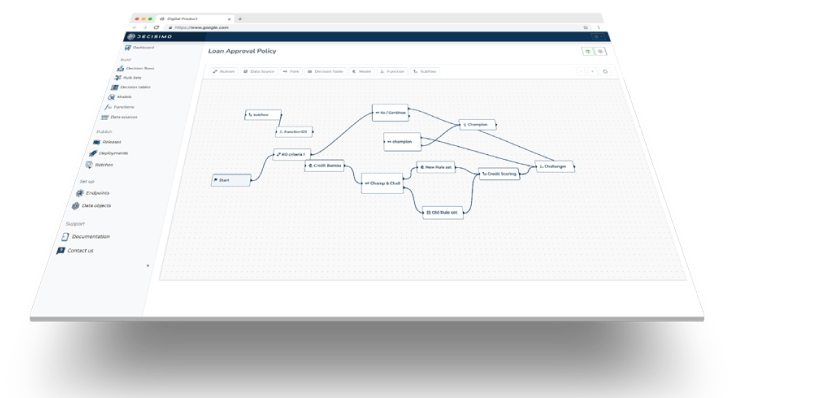
You connect the constructs in a decision flow in the order the policy needs them. Put a hard knock-out in an ordered rule set with recorded hits, then use a decision table for the policy’s decline, refer and approve grid. Selecting first match makes the score of 600 return refer. That is the policy outcome the downstream referral process needs to receive.
If more than one product flow uses the same creditworthiness evaluation, define that evaluation as a sub-flow and call it from each flow. The calling flow passes the relevant application data and receives the result at a chosen attribute. The team then maintains one definition of the evaluation rather than separate copies in each flow.
Test for table overlaps and gaps before release
You should give each important scenario an input and an expected result. For this policy, a score of 480 should decline, 600 should refer, and 700 should approve. An application with no income should receive the incomplete-information outcome. At the fork, 35 should reach manual review.
You should check the decision table for overlaps and gaps as well. The decision table checker identifies overlapping rows, combinations with no decision and how missing fields are treated. Save regression tests for the scenarios and edge cases, then run all saved tests before release using the rule-set testing guidance.
Release the tested flow as a frozen copy
A release is a frozen copy of a decision flow. Later edits do not change an existing release, so the tested version can be deployed as a distinct copy of the flow.
Return to the application that came back approved. The decline row was present, but the default last-match setting let the unconditional approve row decide. Before you release the corrected flow, work through the design in order:
- Write the outcomes, the policy’s condition order and who handles referrals.
- Put hard knock-outs in an ordered rule set with recorded hits.
- Put grids of conditions and results in decision tables. Choose the matching-row setting to preserve the policy’s order, and place the default row accordingly.
- Use decision trees for sequential branches, and give every path an outcome.
- Check missing values before numeric comparisons, placing the missing-value condition according to the matching-row setting.
- Connect the logic in a decision flow, reuse shared evaluations in sub-flows and give every fork a manual-review catch-all.
- Check tables for overlaps and gaps, then run regression tests for the relevant segments and edge cases.
- Release the tested decision flow as a frozen copy.
Questions about rules engine design patterns
What is a rules engine design pattern?
It is a way to structure business rules for evaluation, using constructs such as ordered rule sets, decision tables, decision trees and decision flows. Choose the construct that fits the policy, then make its evaluation order and outcomes explicit.
When should a rule be a rule set, a decision table or a decision tree?
Use a rule set for ordered individual rules such as knock-outs, a decision table for a grid of conditions and results, and a decision tree when the policy branches on attributes in sequence. Check that each structure preserves the intended outcomes.
What is a hit policy in a decision table?
It specifies what happens when more than one row matches. Decisimo’s documented settings are last matching row wins and first matching row wins. Choose the one that preserves the policy’s order.
How are rules kept out of application code?
Define them in a decision flow and release a frozen copy for deployment. Test the version intended for release, because later edits do not change an existing release.
How do you test rules before a release?
Save regression tests with inputs and expected results, and check decision tables for overlaps and gaps. Run all saved tests before release, including cases for important segments and edge conditions.
What should happen when a decision tree has no matching branch?
Treat an uncovered branch as an exception, not as an approval or a completed decision. Add a final branch for all remaining values that sends the application to manual review, then save a regression test for an input in the gap and check that the result is the expected decision.
What does a decision table checker add beyond regression tests?
Use the checker to flag overlapping rows, combinations with no decision, and how missing fields are treated. Keep regression tests for the outcomes the policy requires, since a structurally complete table can still return the wrong decline, referral or approval.
Where should a hard knock-out sit relative to a decision table?
Connect the ordered rule set before the decision table in the decision flow, and route a knock-out hit to its intended outcome rather than into the ordinary score grid. That keeps a later approval row from undoing the policy’s exclusion. Test one input that hits the knock-out and one that passes it, with an expected outcome for each.