Breached password check: what to do at sign-up and login
A customer has just typed Summer2025! into your app’s sign-up form, and the screen says the password is strong. You are reviewing that form before a release, with the requirement visible beneath it: eight characters, a capital letter, a number and a symbol. You own fraud and account security, so you know this screen is part of the account’s first encounter with your controls, not a separate bit of onboarding polish. The customer is still at signup, looking at a label your product has chosen to show. What does that label mean to them, and to the login system you are responsible for?
Composition rules accept passwords breach data already holds
Almost every password we built to satisfy a composition rule was in breach data, and none of the random passwords drawn from the same four character classes was.
The customer who typed Summer2025! did what the form asked. People answer a demand for upper case, lower case, a digit and a symbol with a familiar set of patterns: a common word and digits, a keyboard row, a first name, a city, a month and a year, a season and a year. We built passwords from each family, every one eight characters or longer and every one accepted by the usual rule, and looked each up in the breach data.

| Pattern | Checked | Found | Most seen |
|---|---|---|---|
| a common word and digits, Password1! | 40 | 40 | Password1!, 584,516 times |
| a keyboard row, Qwerty123! | 20 | 20 | Qwerty123!, 184,730 times |
| a first name, Michael1! | 28 | 28 | Michael1!, 43,954 times |
| a city, London123! | 25 | 25 | London123!, 10,833 times |
| a month and year, June@2023 | 40 | 37 | June@2023, 20,506 times |
| a season and year, Summer2023! | 32 | 29 | Summer2023!, 20,181 times |
| 12 random characters | 40 | 0 |
The families built on a common word, a keyboard row, a first name or a city were found every time, and the month and season families were found every time except the ones built on 2026. The most common word-and-digits password has been seen hundreds of thousands of times. The random passwords all came back empty.
Summer2025! itself came back 593 times in our lookup, so a form that runs the check refuses the password it now calls strong. The label describes how a password looks, and the look is all the rule examines.
These are the shapes forms push people toward, and breach data already holds almost all of them.
Set a length minimum and check a blocklist
Drop the composition rule, because it measures the shape of a password and the shapes we built from it were almost all known already. NIST’s guideline on passwords says verifiers shall not impose composition rules such as mixtures of character types. It asks for a minimum of 15 characters when the password is the only factor, and 8 when it is used only within multi-factor authentication.
Teams keep the old rule because customers are used to it, and removing a visible requirement looks like loosening the form. The form gets stricter where it counts. It asks for length, and the customer is free to choose a phrase of their own.
Length is the floor and needs a second control above it, because people build long passwords from the same material as short ones. Long, common passwords sit in breach data too.
| Password | Length | Times seen |
|---|---|---|
| qwertyuiopasdfghjkl | 19 | 114,991 |
| Password12345678 | 16 | 51,704 |
| iloveyouforever | 15 | 18,512 |
| correcthorsebatterystaple | 25 | 4,173 |
| Password123456789! | 18 | 1,734 |
| Welcome123Welcome123 | 20 | 217 |
| Passw0rd!Passw0rd! | 18 | 82 |
| Summer2024Summer2024 | 20 | 1 |
Of the 20 long common passwords we tried, 18 were found.
How the sign-up check works and its limits
Run the check in your application, next to the password. The application hashes the password and sends the first five characters of the hash to the HaveIBeenPwned range API. The service answers with the suffix of every hash that starts with those five characters, each with a count, and the application looks for its own suffix in the list. Only the five characters leave your system. Ask for padded responses as well. Padding adds entries with a count of zero, and you discard them.
The same lookup runs when a customer changes a password, on the new one. A suffix found in the answer means the form asks for a different password and gives the reason, as NIST requires. “This password has appeared in data leaks” tells the customer something they can use on every other site. A bare “choose another password” reads as a fussy form. The lookup covers the password only, so the customer’s email address needs its own check.
The lookup is free and has no rate limit. From Prague its median time was around a quarter of a second in our checks, and the slowest few took most of a second, so the form should never hold a sign-up waiting on it. If the lookup fails or times out, the sign-up goes ahead. The login runs the same lookup after the password is accepted, so the customer’s first login checks the password that sign-up could not.
A password that comes back empty is clear of today’s data and nothing more. The six patterned passwords our check missed were all built on 2026, and the same patterns with 2023, 2024 and 2025 were found. The data trails the calendar.
Why sign-up checks alone leave old accounts exposed
A sign-up check protects the accounts opened after you switch it on. Accounts opened before it existed may already hold a password from the breach lists, so an older book can hold leaked passwords the sign-up check never saw. The sign-up form sees none of those accounts again.
Attackers go to the login. They take email and password pairs leaked from one service and try them on others, because people reuse passwords, and they push them at your login endpoint systematically. They choose accounts that hold something extractable, such as credit, tokens or API access, because a takeover there turns into money. The chain is short: a reused password, a stuffed login, an account whose value leaves through it.
So the lookup runs again at login, after the password is accepted. The application hashes the password and makes the same range call. The answer arrives as plain text lines, which keeps the lookup in your application, and the login decision receives the count as a number in the request.
A count above zero places the password on the lists the attacks run through, and the login decision is where you find out who typed it.
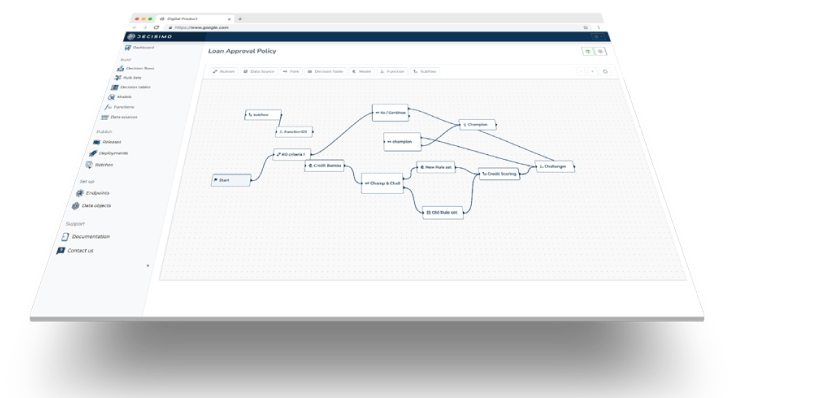
How the login decision treats a breached password
With the count in the request, the login decision compares the device, the address and the browser with what this customer normally uses. The device comes from browser fingerprinting, and the address and the browser string arrive with the request. The password has been accepted by the time the count arrives, so this comparison decides whether the account opens.
When the device, address or browser is unfamiliar, the decision escalates to stronger verification before the account opens. When all three are familiar, the login goes through and the customer is made to set a new password. A rule set reads the breach count together with the device and location fields of the request, and returns one of three outcomes: stronger verification, a forced password change or a pass. NIST asks for a forced change when there is evidence that a password is compromised, and a match is that evidence.
Here is a demo case with two logins, on accounts that both hold a credit line. Both present a password the lookup finds. The first comes from the phone the customer has used for months, from their usual address and browser, so the decision passes the login and sends the customer to choose a new password. The second comes from a device and an address new to the account, so the account stays closed until the customer clears stronger verification, and the password still has to change afterwards. The password and the count are identical, and the comparison separates the outcomes.
Two mistakes are common, and both look reasonable. The first is to block the login outright because the password is known to be bad. The person typing it may be the owner, and a block locks a customer out over a risk the leak created. The second is to treat a found password only as a reason to ask for a new one. That suits the familiar device, but an attacker on a new machine meets the same prompt, and by then the account is open to them.
Which accounts to escalate first
Start the escalation on the accounts that hold credit, tokens or API access, because stuffing is aimed at them. The login decision receives a marker that the account holds such value, next to the breach count, and a rule set can read both: count above zero, unfamiliar device, address or browser, account holds value, stronger verification before it opens.
The trade-off is friction for the customer against takeover of an account worth taking. Extra verification costs a legitimate customer a moment, and some will abandon the login or complain. A takeover of an account with a credit line, tokens or API access hands the attacker value they can extract, and that cost lands on you and on the customer. On those accounts I take the friction. The rest of the book follows on the same rule once the valuable accounts are covered.
Seven changes for the form and the login
Back at the form, Summer2025! is refused with a reason instead of being called strong, and the login behind the form runs the same lookup. On your own book, in this order:
- Replace the composition rule with a length minimum. Remove the demand for a capital letter, a number and a symbol. Set the minimum at 15 characters for a password used alone and 8 behind a second factor.
- Check at sign-up and at password change. Hash the password in the application, send the first five characters of the hash to the range API with padding, and look for the rest of the hash in the answer.
- Refuse a found password and say why. Ask for a different password and tell the customer the one they chose has appeared in data leaks.
- Look the password up again at login. Run the lookup after the password is accepted and pass the count to the login decision.
- Compare before you decide. With a count above zero, compare the device, the address and the browser with this customer’s usual ones. If they are unfamiliar, escalate to stronger verification before the account opens. If they are familiar, let the login through and require a new password.
- Escalate the valuable accounts first. Accounts that hold value an attacker can extract, such as credit, tokens and API access, come first.
- Plan for a failed lookup. If the lookup fails or times out, let the sign-up through and check again at the next login.
Questions about breached password checks
Is a password safe if it meets complexity rules?
No. A composition rule tests the shape of a password, and the shapes people produce to satisfy it are very often in breach data. In our checks 179 of 185 passwords that passed the usual rule were found, and random ones from the same character classes were not. Drop the rule, set a length minimum and check against breach data.
How can a password be checked against breach data if it never leaves the app?
The application hashes the password and sends only the first five characters of the hash. The service returns every matching suffix with a count, and the application looks for its own, so the password and its full hash stay in your system. Ask for padded responses and discard the padded entries, which carry a count of zero.
Should a breached password block a login?
Not by itself. The password has been accepted already, so a match is evidence of compromise and the question that follows is who is using it. An unfamiliar device, address or browser gets stronger verification before the account opens, and a familiar one passes and the customer sets a new password.
Which accounts do credential stuffing attacks go after?
Accounts that hold something that can be taken out: credit, tokens, API access. Attackers push leaked pairs at the login wherever a takeover could pay. Escalate those accounts first.
How long should a password be?
At least 15 characters when it is the only factor, and at least 8 when it is used only within multi-factor authentication. Long common passwords are in breach data too, with 18 of the 20 we tried found, so keep the blocklist check above the minimum.
Does a password that is not found in breach data count as safe?
No. A miss means the password is absent from the data today, and the data trails the calendar. The patterned passwords our check missed were all built on 2026, and the same patterns with earlier years were found. Keep the length minimum and the lookup at login, and judge each login by who is using the password.