How to integrate a GLEIF LEI lookup into business onboarding
A family-owned hotel company is applying to refinance, and its application has come back from the new KYB step with “LEI not issued” attached. You know the company has banked with you for years, but that history is not what the record is showing. The relationship manager wants to know why a familiar customer has been sent into a queue. You open the record and look at the company details, then back at the referral reason. For the person who owns onboarding or credit, this is where a registry status meets a real renewal decision, before the next batch is processed.
Lapsed LEIs often belong to active businesses
We made calls to the GLEIF API on 30 October 2026. Lapsed registrations overwhelmingly had entity status ACTIVE.
| registration status | records |
|---|---|
| all records | 3,479,309 |
| ISSUED | 1,996,911 |
| LAPSED | 1,215,130 |
| RETIRED | 257,889 |
| DUPLICATE | 6,515 |
| ANNULLED | 1,795 |
| PENDING_TRANSFER | 638 |
| PENDING_ARCHIVAL | 431 |
| LAPSED, with entity status ACTIVE | 1,215,129 |
| entity status INACTIVE, any registration status | 257,472 |
The country results show the same issue in the United Kingdom: lapsed records outnumber issued ones. An ISSUED-only referral rule sends operating businesses into a queue over a missed renewal.
| country | ISSUED | LAPSED |
|---|---|---|
| GB | 95,054 | 117,317 |
| ES | 105,819 | 78,294 |
| FR | 96,690 | 74,596 |
| IT | 173,586 | 67,789 |
| DE | 186,532 | 55,570 |
| NL | 129,760 | 46,488 |
| PL | 25,394 | 14,832 |
| CZ | 19,038 | 11,752 |
| IE | 22,972 | 11,440 |
The hotel in your referral has a LAPSED registration and entity status ACTIVE. Companies House also lists the company as Active and gives its incorporation date as 1978. The registration status alone cannot tell you that the business has closed.
LEI and entity status answer different questions
Registration status describes the LEI registration. Entity status describes what is known about the entity’s legal registration and operation.
ACTIVEmeans the entity reported that it was legally registered and operating as of its last report or update.INACTIVEmeans it has been determined that the entity was no longer legally registered, operating, or both. Closure, acquisition and merger are among the possible reasons.LAPSEDmeans the registration missed its renewal date, with no public indication that the entity has ceased operation.RETIREDmeans the entity ceased operating, with no merger into another entity.ANNULLEDmeans the registration was marked erroneous or invalid after it was issued.
For the hotel, the matching Companies House record reports the company as Active and gives its incorporation date.
Find an LEI with registry number and country
Search with the registry number and jurisdiction together, preserving the number exactly as the registry writes it, including leading zeros. In our calls, the hotel’s Companies House number with country code GB found its LEI. Dropping the leading zero returned no record, and using the number without its jurisdiction returned more than one.
The GLEIF API supports searches of legal entity and ownership data, including parent and child relationships. In Decisimo, configure a data source to make a GET request and read the JSON response into the data object. The registry number and country can come from the application through the decision flow.
Set Accept: application/vnd.api+json in the data source’s request headers, following the data source documentation as you configure the call. With that header, an unknown LEI returned a JSON 404 that the rule can read. With Accept: */*, the response was an HTML page. Map the JSON 404 to the outcome “no LEI on file” and distinguish it from a failed call.
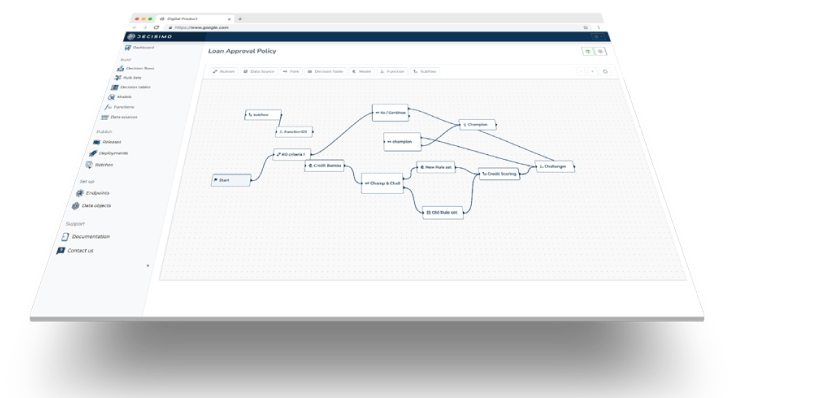
Route LEI records by status and legal name
Use a decision table to turn the returned record into an outcome. The example below routes an entity reported as INACTIVE, or a registration marked RETIRED or ANNULLED, to a person. It continues a LAPSED registration on an ACTIVE entity with a renewal flag, and refers a legal-name mismatch. These are example outcomes for a lender to set, not a universal policy. The business lending application is where the lender’s policy determines how these checks affect the decision.
This example uses first matching row wins, so row order determines which condition returns an outcome.
| row | condition | outcome |
|---|---|---|
| 1 | no record found for the registry number and country | continue, LEI not on file |
| 2 | entity status INACTIVE, or registration RETIRED or ANNULLED | refer: entity reported closed, merged or record invalid |
| 3 | legal name differs from the name on the application | refer: name mismatch |
| 4 | registration LAPSED and entity ACTIVE | continue, flag LEI lapsed |
| 5 | any value | continue |
For the hotel, the record’s ACTIVE entity status and LAPSED registration reach the continue-with-renewal-flag row once its name matches. The LEI record gives the legal name as MERTON HOUSE HOLIDAY HOTEL LIMITED. Compare that name with the legal name on the application before the final decision.
Use the ultimate parent LEI to group exposure
Use the ultimate parent’s LEI as the group key for exposure checks. Parent relationships add ownership context to the individual borrower record, including a foreign owner behind a local applicant.
Fetch the parent relationship from the LEI record and retain the ultimate parent LEI as the group key. If the parent is missing, keep that value missing. The group exposure check can then use returned parent LEIs to bring related borrowers together.
Status and parent information can change. Re-check the book in a batch for changes to either field, then review the records whose status or group key has changed.
Apply LEI checks to renewal batches
At the next renewal batch, use this procedure on your book:
- Find the record from the registry number and country, written exactly as the registry writes it, including leading zeros.
- Send the JSON Accept header and map a JSON 404 to “no LEI on file.”
- Send entity status
INACTIVE, or registration statusRETIREDorANNULLED, to a person. - Read
LAPSEDon anACTIVEentity as a renewal flag. - Compare the legal name with the name on the application.
- Fetch the ultimate parent and keep its LEI as the group key for exposure. Keep a missing parent missing.
- Re-check the book in a batch for status and parent changes.
Questions about GLEIF LEI lookups
Does the GLEIF API need a key or an account?
No key or account was needed for the GLEIF API calls described here. Send the lookup request with the JSON Accept header.
What does a LAPSED LEI mean?
It means the registration missed its renewal date, and public sources have given no indication that the entity ceased operation. Our checks found lapsed registrations on entities reported as active. Read LAPSED as a renewal flag and use entity status to assess the reported operation.
How do I find a company’s LEI from its registry number?
Search the registry number together with its jurisdiction, preserving the exact number and any leading zeros. Our checks found that the registry number and country together returned the company’s record. Use both values in the lookup.
How do I get a company’s parent from the LEI?
Search the ownership relationships using the company’s LEI. The GLEIF API supports parent and child relationship searches, and the ultimate parent’s LEI can serve as the group exposure key.
What does the GLEIF API return for an LEI that does not exist?
An unknown LEI returns HTTP 404. With Accept: application/vnd.api+json, our call returned a JSON error body. Map that response to “no LEI on file.”
Is GLEIF data accurate enough to decide on?
Use it as an input to the decision, rather than conclusive proof of identity or current accuracy. GLEIF’s terms say it does not warrant that the information is accurate, correct or up to date. Compare the legal name with the application and use relevant registry information alongside the LEI record.
How fast is a GLEIF lookup?
Expect roughly half a second per lookup based on our calls: five registry-number lookups took 0.48 to 0.62 seconds each, and a lookup by LEI took 0.50 seconds. Measure the response time in your own integration before setting expectations for your application flow.