Subdomain Verification for Email Authentication
Introduction:
Teams working in fraud prevention know that verifying whether an email address is real matters. A solid email check helps separate legitimate addresses from junk. This article describes a simple method for checking email addresses by looking at their subdomains.
Problem Definition:
A common problem in email validation is telling real corporate emails apart from junk or malicious mail. Standard verification methods often miss that distinction, which leads to false negatives or false positives.
One signal that often gets ignored is the presence of subdomains in corporate email domains. A corporate domain is likely to have multiple subdomains that support business services. These may include virtual private network (VPN) endpoints, drives, email servers, and other internal company services.
Problem Resolution:
The solution is to check whether a domain has subdomains. For that, we can use the SecurityTrails Subdomains API service. The API makes it possible to inspect subdomains linked to a given email address.
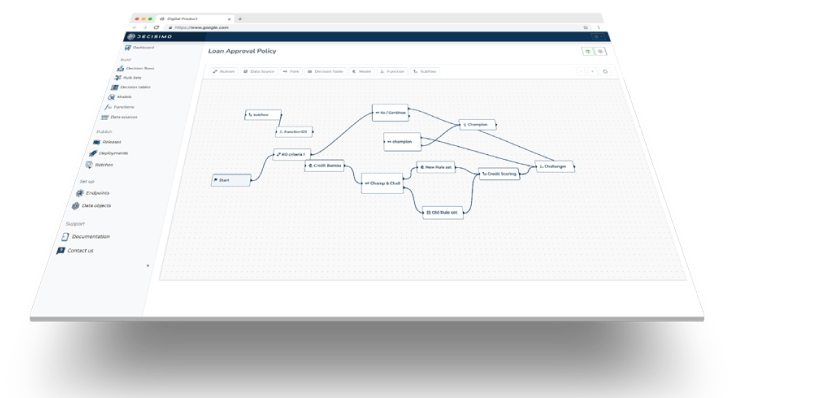
In the decision flow, the process starts by calling the SecurityTrails Subdomains API to check for subdomains linked to the domain. Then rules run based on the result of that check. The presence of subdomains can indicate that the domain belongs to a legitimate corporate entity, which improves the email verification process.
Proposed Rules for the Fraud Rule Engine:
To make this practical, the check needs to be integrated into the existing fraud rule engine. Here are rules that can be implemented:
- Data source call: Make an initial call to SecurityTrails Subdomains API to check for subdomains associated with the domain from the email address.
- Rule 1: If no subdomains are found, flag the email address as potentially fraudulent.
- Rule 2: If subdomains are detected, run additional checks for common business-related subdomains such as 'vpn', 'email', 'drive', etc.
- Rule 3: If none of these business-related subdomains are found, flag the email address as potentially fraudulent.
- Rule 4: If these business-related subdomains are present, validate the email as legitimate.
This approach uses subdomains as a criterion for email validation to separate genuine corporate emails from junk mail. Adding these rules to the fraud rule engine improves the accuracy of the email verification process and supports stronger anti-fraud operations.
Frequently asked questions
How can subdomains help verify a corporate email address?
Subdomains can help identify corporate email domains because companies may use them for services such as VPN endpoints, drives and email servers. Their presence can indicate that a domain belongs to a legitimate corporate entity. Fraud rules can use business-related subdomains as a signal when assessing an email address.
What does the SecurityTrails Subdomains API check?
The SecurityTrails Subdomains API checks whether a domain from an email address has associated subdomains. The fraud decision flow uses the result to flag the email address as potentially fraudulent if no subdomains are found, then checks for business-related subdomains when some are present.
What happens if business-related subdomains are found?
If business-related subdomains such as VPN, email or drive are present, the proposed fraud rules validate the email address as legitimate. The decision flow first checks whether the domain has subdomains, then looks for those business-related names. If none are found, the email address is flagged as potentially fraudulent.