Rules to stop junk logins and bot attacks
A new dump of credentials from a leak has appeared on the dark net, and one of the script kiddies running credential stuffing is using it against your login, trying thousands of leaked username and password pairs, one after another. Then your sign-up form starts filling with throwaway addresses. You can see clues in both attacks, but no single provider sees all of it.
You do not need one fraud platform to stop this. Use a few free or cheap checks that each catch one kind of attack, run them together while the person waits, reserve one paid check for the attempts still in doubt, and put rules you own on top.
What you are fighting
Each attack leaves a different kind of signal. Counts, password history, network reputation and device information become useful when the rules read them for the decision they can support.
| Attack | What it looks like | What gives it away |
|---|---|---|
| Credential stuffing | Leaked username and password pairs are tried by the thousand. | Many attempts over time, often from the same IP or device, plus passwords found in breaches. |
| Password guessing | Many passwords are tried against one account. | Attempt counts for the account, IP or device. |
| Junk sign-ups | Accounts are created with throwaway email addresses. | A disposable domain, an email with no past history or a missing record. |
| Automated traffic | Requests arrive from hosting networks, Tor or proxies. | Network type, IP reputation and device bot detection. |
| Account takeover | An existing account is used from a device or country it has not used before. | A new device or country, combined with the other signals on the request. |
The checks worth knowing
Pwned Passwords
Use Pwned Passwords to check whether the submitted password has appeared in known breaches. It is free and fits at sign-up or login before you decide whether a breached password needs a step-up.
AbuseIPDB
Use AbuseIPDB for the IP address behind the request. A rule can read abuseConfidenceScore, usageType, isTor and report counts to distinguish a reported address or hosting network from an ordinary ISP address. Call it when the IP should affect the login or sign-up decision.
Fingerprint
Use Fingerprint to identify the device and browser behind the request. The rule can read visitor_id, the bot result and velocity across IPs, countries and events over the available time windows. It belongs early in a login flow when repeat attempts, automation or an unfamiliar device should change the result.
MaxMind minFraud
Use minFraud for a risk score and anonymizer or email signals. Depending on the tier, the response can include hosting, Tor, VPN and proxy flags, plus disposable or high-risk email indicators and reasons behind the score. Keep the call for requests that still need a paid risk assessment.
ArkOwl
Use ArkOwl for email and phone history from open sources. Rules can read whether an address has been seen, whether it has bad activity, whether it is disposable and which services have registered it. One fresh throwaway address passed the blacklist exactly like a real one because nobody had reported it. Its missing history, returned as no_data: true, gave it away.
Have I Been Pwned breached account
Use the breached-account check to see whether an email appears in known breaches. The response lists the breach name, date, PwnCount and data classes, or returns not found. It needs a paid key, so call it after cheaper checks when the email history can resolve the remaining doubt.
Trestle
Use Trestle for identity and contact signals across the IP, email and phone. A rule can read IP trust, email validity or disposability, email age score, phone line type and activity, or the named warnings from Decision Signals. It is suited to the one paid identity call reserved for an attempt that survives the first checks.
Private State Tokens
Use Private State Tokens as a browser signal that conveys trust from an issuing site to a relying site. A trusted issuer gives the browser a token, and another site redeems it later to help distinguish bots from real users. There is no fee, so it can sit beside the other early checks in Chrome.
What they cost
The prices below were published on each vendor’s website on 3 October 2026.
| Check | Price |
|---|---|
| Your own lists and counts | nothing per call |
| Pwned Passwords | free |
| Have I Been Pwned breached account | from $4.39 a month for 10 requests a minute |
| Private State Tokens | free |
| AbuseIPDB | free to 1,000 a day; $25 a month for 10,000 a day |
| Fingerprint | free to 1,000 a month; $99 a month for 20,000, then $4 per 1,000 |
| MaxMind minFraud Score | $0.005 a query |
| MaxMind minFraud Insights | $0.015 a query |
| Trestle Real Contact | $0.03 a query |
| Trestle Decision Signals | $0.10 a query |
| ArkOwl | not published |
Run free and cheap checks together first, then reserve the paid call for attempts still in doubt.
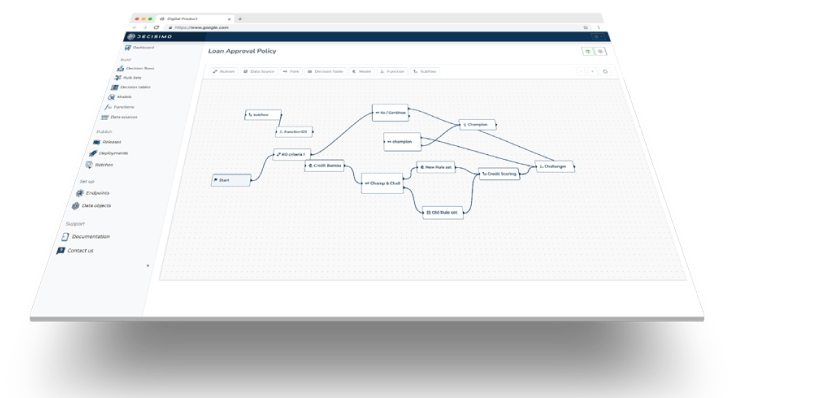
Run the cheap checks together, pay only for the doubtful
Putting every check into its own stage saves money because a knock-out stops later calls. It also adds a wait for each stage. Several sources in one stage run together, so that stage waits for its slowest source rather than adding every wait together.
At a login or checkout, a person is waiting. Put your own lists and counts, Pwned Passwords, AbuseIPDB and Fingerprint in the first stage. A knock-out can return block or step-up there. Only the attempts still in doubt move to a second stage with one paid risk or identity call, such as Trestle Decision Signals. At sign-up, a short wait is acceptable, so ArkOwl or the breached-account check can sit in its own stage behind the free checks.
Cache repeat lookups when the source supports it. Set the maximum age per source, store only successful non-empty responses and carry the age of a cached answer into the decision. The same IP or email can be looked up repeatedly in a day.

A provider error or timeout should remain visible to the rules. Its values are absent and an error flag is set, so you can choose step-up rather than allow. A source marked safe to repeat can be retried once inside its own time limit.
Rules to start with
Counts come from the login service or from Fingerprint’s velocity. Add points when conditions hold, then let a decision table map the total to an action. Define these decision actions:
- A hard block stops the attempt.
- Points contribute to a total.
- A step-up asks for more verification, such as a one-time code or Private State Token.
- A manual-review outcome holds the request for review.
- A monitor outcome allows the request and flags it for later analysis.
The table below is a starting point for fraud decisioning, not a set of recommended thresholds. Test each stricter rule against last month’s requests before switching it on.
| Rule | Condition | Action |
|---|---|---|
| Breached password | The password is found in Pwned Passwords. | Step-up |
| Known bad device | visitor_id is on your block list. | Block |
| Automation | Fingerprint bot is bad. | Block |
| Tor or hosting network | AbuseIPDB isTor is true, or usageType is a hosting network. | Step-up |
| Reported address | abuseConfidenceScore is 75 or more. | Add points |
| Many attempts | More than 25 events for the visitor appear in the shortest velocity window. | Block |
| Throwaway email at sign-up | ArkOwl no_data is true and the domain is a known disposable provider. | Review |
| Provider did not answer | The source’s values are absent and its error flag is set. | Step-up |
Keep block, allow and watch entries as data rather than embedding them in the rule logic. An email entry ignores case, a domain entry covers its subdomains, a device identifier matches exactly and a prefix entry matches values that start with it. Entries can expire, and a failed IP can be added to a watch list after the decision. A list change is then visible to the next request without a release.
Run the current and proposed rules over the same past requests. The changed decisions show who would have received a different result. Inspect those before the new rule goes live.
Two sign-ups, side by side
Invented example. These two requests arrive at the same product in the same minute. The free and cheap checks already separate them, so neither needs the paid identity call.
| Signal | First sign-up | Second sign-up |
|---|---|---|
| Connection | Residential connection | Hosting network |
| Seen for years with a registered account | no_data: true on a disposable domain | |
| Password | Not found in breaches | Found in breaches |
| Device and attempts | Device seen before | Fingerprint marks bot: bad, with 40 attempts from the same visitor in under five minutes |
Frequently asked questions
Can repeated lookups be cached?
Yes, when the source supports it. Set a maximum age for each source, store only successful non-empty responses and keep the age with the cached answer. The rules can then distinguish a recent provider response from an older one.
What happens when a provider times out?
The provider’s values are absent and an error flag is set, so the decision carries on and your rules choose what that means, for example a step-up. A source marked safe to repeat is retried once inside its own time limit.
Is a password ever sent to Have I Been Pwned?
No. Pwned Passwords uses a k-anonymity model. Only the first five characters of the password’s SHA-1 hash are sent, and the password stays in your system.
Do I need all of these services?
No. Each service covers a different signal, and no single check stops an attack on its own. Start with the free or low-cost checks that match the attacks you are seeing, then add one paid identity call for the attempts that remain in doubt.